A Canva alternative for social content creation and publishing
Canva can take a social post from a template to its Content Planner. The Post Engine connects brand research and AI creation with a social scheduling workflow. This comparison focuses on creating and publishing social content. 13
14 days free for first-time subscribers. Card required. Then $15 USD/month automatically unless you cancel before the trial ends.
The Post Engine vs. Canva at a glance
The Post Engine
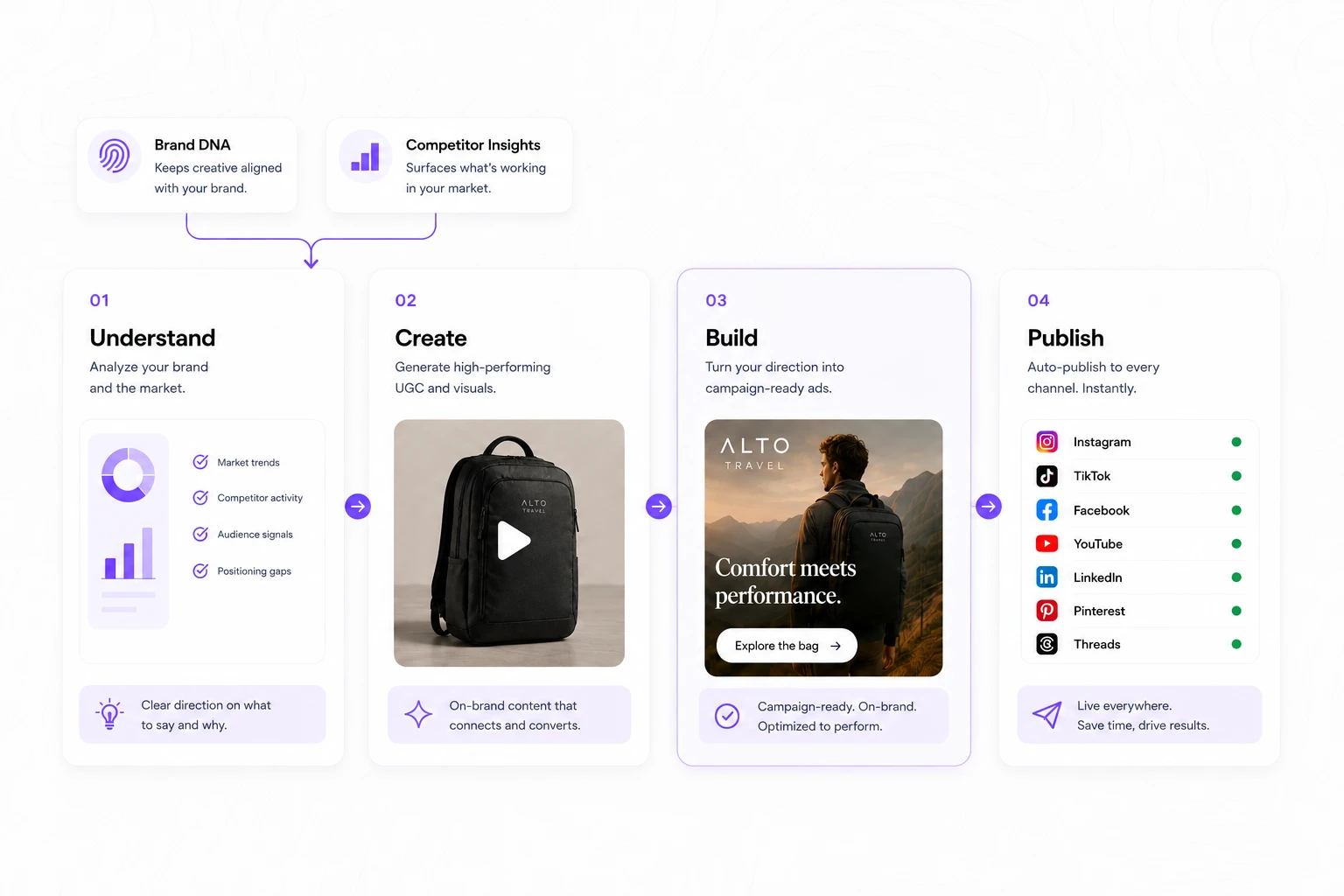
The Post Engine is built around research, targeted marketing assets, and publishing to supported social accounts. Consider it for product and ad visuals that will go straight into a social campaign.
Feature comparison
Scroll the table to see both tools.
| Feature | The Post Engine | Canva |
|---|---|---|
| Scheduling and publishing | Every subscription includes unlimited scheduling and publishing, subject to the publishing fair-use policy and supported formats. See the fair-use policy. | Canva Pro includes scheduling through Content Planner and the editor. Scheduling restrictions vary by design, network, and account. 13 |
| Supported publishing networks | Instagram, Facebook, TikTok, YouTube, Pinterest, LinkedIn, and Threads. Account types and post formats vary by network. | Content Planner lists Facebook Pages, Instagram Business, X, LinkedIn, Pinterest, Slack, and Tumblr. Check the editor’s Share menu for currently available connections. 34 |
| Brand research | Brand Intelligence reports analyze brand voice and content performance. Launch offers report packs, and Growth includes up to 30 brand reports per month. | Canva Pro lists five Brand Kits for applying saved brand assets in designs. 1 |
| AI social content creation | Create and revise social posts and visuals in AI Content Studio. Launch uses pay-as-you-go credits. Growth and Scale include monthly allowances. | Canva Pro includes premium AI tools and a shared monthly allowance for qualifying tasks. An AI Pass is available separately. 1 |
| Product images and ad creative | AI Content Studio offers product photo scenes and ad creatives. Studio availability and usage depend on the plan and credits. | Canva lists AI ad creation alongside a general design and photo editing suite. 1 |
| Editing and approvals | Preview and edit a draft, then approve it for scheduling in the post workflow. | Review and edit a design in Canva and schedule it from the editor. Team visibility and publishing depend on the sharing setting for the connected account. 31 |
Pricing comparison
US public prices before tax. Equivalent monthly rates under annual billing are shown separately.
Scroll the table to see both plans.
| Billing detail | The Post Engine Launch | Canva Pro |
|---|---|---|
| Monthly billing (USD) | $15 per subscription | $18/month for one person at the regular US monthly rate. 1 |
| Annual billing (USD) | Public subscription pricing is monthly. | $144/year for one person on US yearly billing ($12/month equivalent). 2 |
| Accounts and included usage | 3 connected social accounts, with manual creation, editing, and publishing. AI services are paid separately on Launch. | Pro includes Content Planner and five Brand Kits. AI allowances depend on the tools used, with an optional paid AI Pass. 13 |
| Free plan or trial | 14 days free for first-time subscribers. Card required. Then $15 USD/month automatically unless you cancel before the trial ends. | Canva Free includes design tools and limited AI. Canva advertises a Pro trial, with trial AI access at the Free allowance until paid service begins. 12 |
How the workflows differ
Start with a layout or a brief
In Canva, edit a social design and apply brand assets from a kit. In The Post Engine, use brand or competitor findings to brief an original product scene or campaign visual, then edit the result. 13
Send the design or post to a channel
Canva lets you choose a design, channel, and time from the editor or planner. The Post Engine lets you preview, approve, and schedule supported social posts from its publishing workflow. 3
Strengths and limitations
The Post Engine publishes this comparison and sells one of the products covered.
Who each tool suits
Creators who design from templates
Canva Pro can suit creators who make graphics by hand and want to schedule selected designs from the same editor. 13
Small stores making campaign assets
The Post Engine can fit a store that needs research and new product or ad imagery for several social accounts. Canva can complement it for template-driven graphics. 1
Frequently asked questions
Can I schedule social posts on Canva Free?
Canva Free includes design and sharing tools. Canva lists social scheduling as a paid Pro capability. 13
Can Canva Content Planner schedule to an Instagram Creator account?
Canva’s Instagram instructions specify a Business account linked to a Facebook Page for this workflow. 43
Can I use Canva and The Post Engine together?
Yes. Create and export an image in Canva, then upload it as media when composing a compatible post in The Post Engine. 1
Sources and methodology
We reviewed Canva’s public pricing and documentation for the US market. The comparison describes documented capabilities. We did not conduct hands-on competitor testing. We selected dimensions relevant to this workflow and show billing units, plan restrictions, and extra charges where documented.
- Canva US monthly pricing and plan features · Verified
- Canva US yearly pricing · Verified
- Canva Content Planner workflow and supported networks · Verified
- Canva Instagram scheduling requirements · Verified
Related comparisons and resources
Try The Post Engine on your next campaign
Draft, review, and schedule a post with Launch. Add AI services when you need them.
14 days free for first-time subscribers. Card required. Then $15 USD/month automatically unless you cancel before the trial ends.