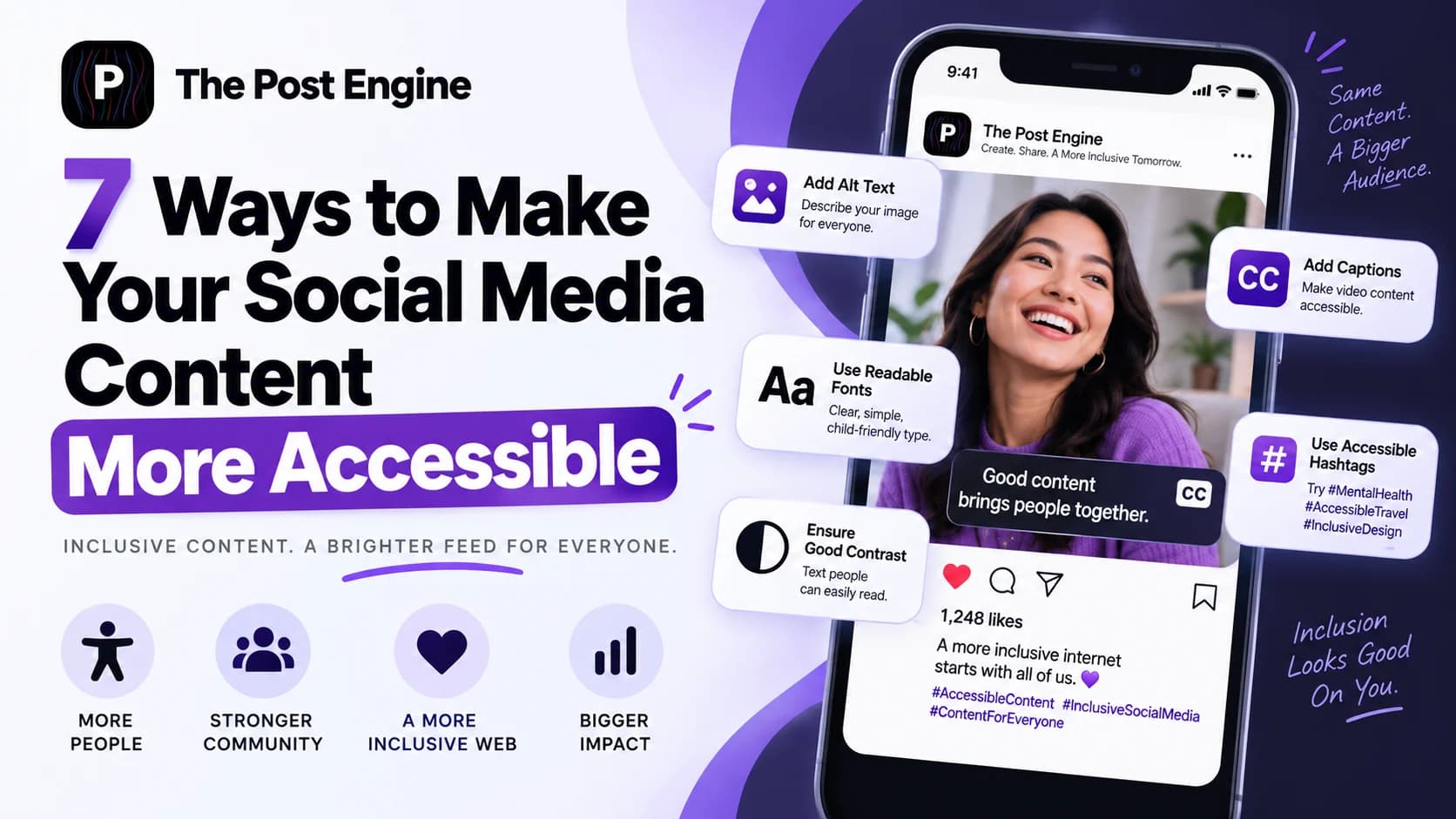
Learn 7 practical ways to make social media posts more accessible with better alt text, captions, contrast, readable copy, hashtags, and inclusive visual design.
Social media content is not truly effective if part of your audience cannot understand or interact with it.
A graphic may look great but contain important information that isn't available to screen readers.
A video may be engaging but rely entirely on spoken audio.
A caption may be technically correct but difficult to understand because of dense language, excessive emojis, or inaccessible hashtags.
Accessibility helps remove these barriers.
And it isn't only about disability. Captions can help people watching without sound, clear contrast can help people viewing a phone outdoors, and simple language can make content easier for almost everyone to understand. The UK Office for National Statistics specifically notes that accessibility improvements can benefit people with permanent, temporary, and situational needs. ONS Digital — Making Social Media Accessible
The broader web also still has a major accessibility gap. WebAIM's 2025 analysis found 50.96 million detected accessibility errors across one million home pages, averaging about 51 errors per page. WebAIM — The WebAIM Million 2025
The better approach is:
Design social content so the message doesn't depend on one sense, one format, or one way of interacting.
Write Alt Text That Adds Meaning
Alt text gives users who cannot see an image a text-based description of the information it communicates.
But good alt text is not simply a list of everything visible in the image.
It should explain what matters.
For example, imagine a post promoting a product:
Weak alt text:
“Woman holding bottle.”
Better alt text:
“Customer holding the brand's reusable water bottle while hiking outdoors.”
The second version communicates the context that matters to the post.
Government Communications guidance recommends keeping alt text short and specific, describing the information that matters, and avoiding phrases such as “image of” or “picture of.” It also warns against relying entirely on automatically generated alt text. Government Communications — Accessibility Standards
The UK Government's accessibility team also recommends manually checking AI-generated descriptions because automated image descriptions can miss important context or make inaccurate assumptions. Government Accessibility — Alternative Text in Action
Best combination:
What is shown + what matters + relevant context
IMAGE 2 — ALT TEXT
Add Captions to Every Video
A video that depends entirely on audio excludes people who cannot hear it.
But captions also help people who:
Watch without sound
Speak another language
Are in a noisy environment
Are in a quiet environment where audio is inappropriate
WCAG 2.2 requires captions for prerecorded synchronized media at Level A, and defines captions as including both speech and meaningful non-speech audio information. W3C — WCAG 2.2: Captions
Harvard's accessibility guidance also notes that captions can benefit people who are Deaf or hard of hearing, non-native language speakers, people with learning disabilities, and people watching in noisy environments. Harvard — Multimedia Accessibility
So don't treat captions as an optional add-on.
For short-form social videos, check that captions are:
Accurate
Synchronized
Readable on mobile
Large enough to follow
Not covering important visuals
IMAGE 3 — VIDEO CAPTIONS
Make Text and Visuals Easy to Read
Good design isn't only about looking attractive.
It also needs to remain understandable.
Start with:
Readable font sizes
Strong text-background contrast
Short blocks of text
Clear spacing
Simple layouts
WCAG 2.2 sets a minimum 4.5:1 contrast ratio for normal text and 3:1 for large text at Level AA. W3C — WCAG 2.2: Contrast Minimum
This is especially relevant for social media because your content may appear on small screens, in bright environments, or over busy photographs.
Instead of putting white text directly over a detailed photo, you could use:
Solid background → Text
or:
Photo → Dark overlay → Text
The goal is simple:
Don't make people work to read your message.
Best combination:
High contrast + large enough text + uncluttered composition
Don't Use Color as the Only Signal
Color can communicate a lot:
Green = correct
Red = incorrect
Blue = option A
Yellow = warning
But color should not be the only way information is communicated.
WCAG 2.2 explicitly states that color should not be the sole visual means of communicating information or distinguishing an action. W3C — WCAG 2.2: Use of Color
Instead of:
Red = Cancel
use:
✕ Cancel
Or instead of:
Green product = Available
add:
Available
You can combine color with:
Text
Icons
Labels
Patterns
Shapes
This makes the meaning understandable even when color differences are difficult to perceive.
IMAGE 4 — COLOR ACCESSIBILITY
Write Hashtags for Screen Readers
Hashtags can also affect accessibility.
Compare:
#socialmediamarketing
with:
#SocialMediaMarketing
Using capital letters to separate the words makes multi-word hashtags easier for screen readers to interpret and easier for many people to scan visually.
Perkins School for the Blind recommends capitalizing the first letter of each word in a hashtag and keeping the hashtag concise. Perkins — Accessibility Tips for Social Media
Government Communications guidance similarly recommends writing hashtags in camel case, such as #AccessibilityAwareness, rather than running all the words together. Government Communications — Accessible Social Media Campaigns
You should also avoid turning your caption into a wall of hashtags.
A better format is:
“New guide for ecommerce brands.#EcommerceMarketing #SocialMediaTips”
Best combination:
Short hashtag + capitalized words + relevant use
Keep Copy Simple and Avoid Information Overload
Accessibility isn't only visual.
The way you write also matters.
Long sentences, unexplained jargon, excessive emojis, and crowded captions can make content harder to follow.
Government accessibility guidance recommends using clear language and warns against using emojis to communicate the core message. Government Communications — Accessible Social Media Campaigns
For example, instead of:
“🚀🔥 Don’t miss this AMAZING opportunity!!! 😍😍 Tap NOW!!!”
try:
“New product launch: See what changed and why it matters.”
The second version is easier to understand and gives the audience useful information immediately.
Use emojis as decoration or tone—not as the only carrier of meaning.
Also avoid unnecessary abbreviations and technical language when simpler wording works.
Best combination:
Short sentences + clear hierarchy + familiar language
Make Important Information Available Outside the Image
Don't put your entire message inside a graphic and assume everyone will see it.
Suppose your image says:
20% OFF
THIS WEEKEND ONLY
USE CODE: SAVE20
If that information exists only inside the image, some users may not receive the full message.
Put important information into the post text too.
For example:
20% off this weekend with code SAVE20. Offer ends Sunday.
The image can still communicate the promotion visually, but the caption makes the information available in text.
The Local Government Association recommends not relying on the image alone to communicate important information and suggests putting key information into the post text or description. Local Government Association — Guide to Creating Accessible Social Media Content
For charts, diagrams, and complicated graphics, consider providing a text explanation or data table as well. W3C's accessibility guidance emphasizes providing text alternatives for non-text content. W3C — Web Content Accessibility Guidelines 2.2
IMAGE 5 — TEXT ALTERNATIVE
Build Accessible Social Content With The Post Engine
Accessibility should be part of the content creation process, not something added after publishing.
With The Post Engine, you can create social content while keeping accessibility considerations in the creative process.
For example:
Content idea
↓
Choose format
↓
Create visual
↓
Check text readability
↓
Prepare caption
↓
Add accessibility details
↓
Publish
For a product post, that could mean:
Clear product image
Readable headline
Strong contrast
Simple layout
Descriptive alt text
Accessible caption
For a short video:
Product video
Captions
Clear on-screen text
Strong contrast
Simple motion
Descriptive post copy
The goal is not to make content look “less creative.”
It's to make the creative understandable to more people.
You can also connect this article with your existing:
How to Generate Different Social Media Post Styles in One Place
IMAGE 6 — THE POST ENGINE
Frequently Asked Questions
What is accessible social media content?
Accessible social media content is designed so people with different visual, hearing, cognitive, and motor needs can understand and interact with it.
What is the most important accessibility improvement for social media images?
Start with descriptive alt text for informative images and make sure important information isn't available only inside the graphic. Government Communications — Accessibility Standards
Should every social media video have captions?
For prerecorded video with meaningful audio, captions are a core accessibility requirement under WCAG 2.2. W3C — Captions for Prerecorded Media
What contrast ratio should social media text use?
WCAG 2.2 Level AA specifies at least 4.5:1 for normal text and 3:1 for large text. W3C — Contrast Minimum
Should I use AI to write alt text?
AI can be useful for creating a first draft, but review it before publishing. Government accessibility guidance specifically warns that automatically generated descriptions can miss context or contain inaccuracies. UK Government — Alternative Text in Action
Final Takeaway
Accessible content doesn't require completely different social media strategies.
It requires better execution.
Use:
Alt text for informative images.
Captions for videos.
Strong contrast for readable text.
Labels and icons instead of color alone.
Accessible hashtags with clear word separation.
Simple language for easier comprehension.
Text alternatives for important visual information.
The process becomes:
Create → Check → Make accessible → Publish → Learn
Accessibility is not about limiting creativity.
It's about making sure more people can actually experience what you created.