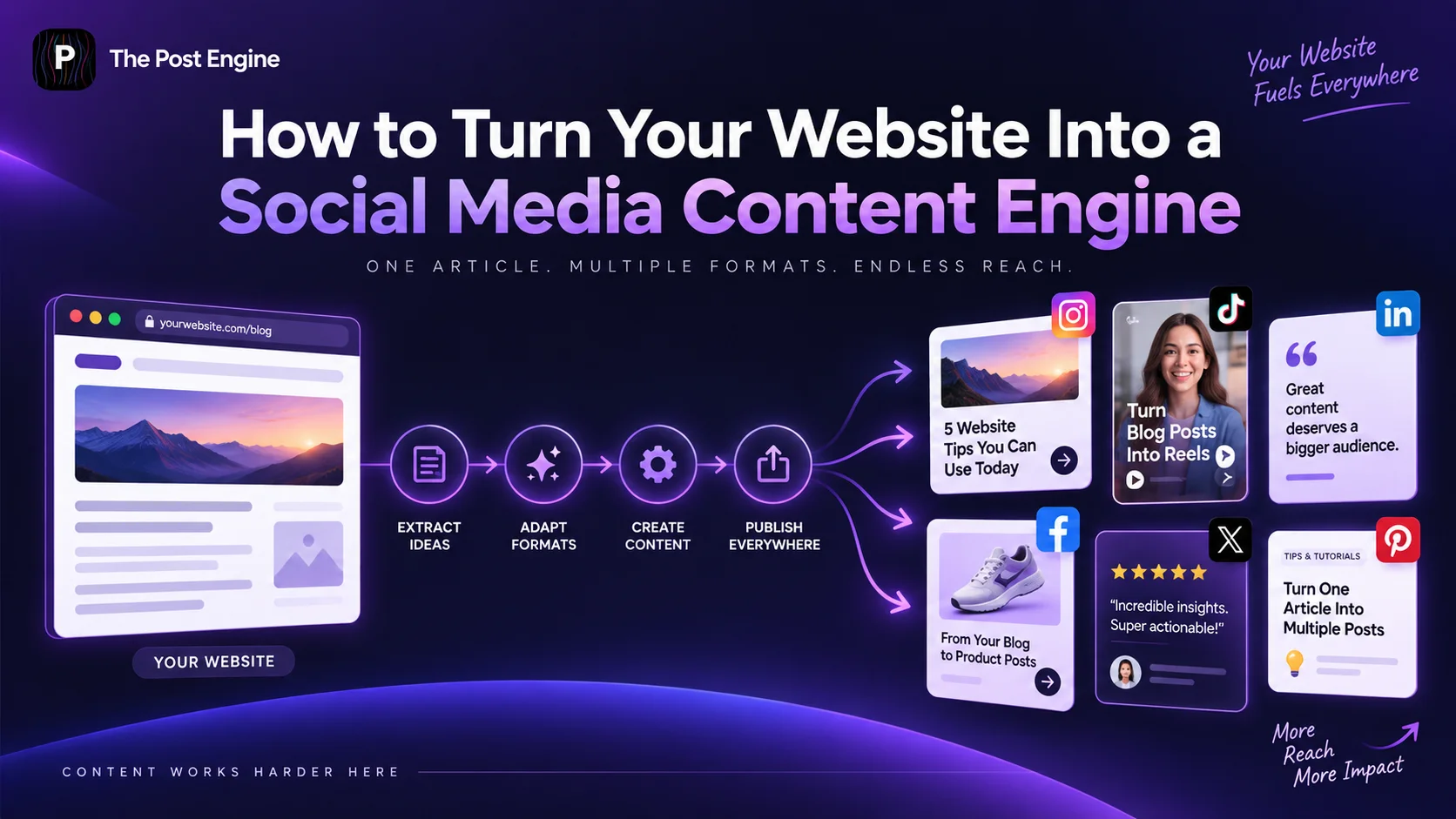
Learn how to turn your website pages, blog posts, products, FAQs, and customer insights into a steady stream of social media content without creating everything from scratch.
Your website already contains more social media content than you may realize.
A product page can become a product post.
A blog article can become a carousel.
An FAQ can become a short video.
A customer review can become a social proof graphic.
The problem is usually not lack of content.
It's failing to turn the content you already have into formats people want to consume on social media.
Recent ecommerce guidance from Shopify recommends repurposing existing content into different formats and adapting it for different platforms instead of constantly creating everything from scratch. Shopify — 4 Ways to Repurpose Content Thoughtfully
The better approach is:
Build your website once. Then let it feed your social media content.
Start With Your Website's Content Sources
Before creating anything new, look at what your website already contains.
You may have:
Blog posts
Product pages
Landing pages
FAQs
Customer reviews
Case studies
Tutorials
Buying guides
Product comparisons
Each one can become multiple social media ideas.
For example:
One blog post
→ Carousel
→ Short video
→ Quote graphic
→ Text post
→ Infographic
This is the basic idea behind content repurposing: adapt an existing asset into different formats instead of recreating the original idea from zero. Buffer — The Complete Guide to Content Repurposing
The first step is therefore simple:
Audit your website before planning your next content calendar.
Turn Blog Posts Into Social Content
Your blog is one of the easiest places to find social media ideas.
A single article may contain several useful points that can stand alone.
For example, a blog post called:
“How to Choose the Right Running Shoes”
could become:
Post 1: 5 mistakes to avoid
Post 2: How to choose the right fit
Post 3: Running shoe checklist
Post 4: Common buying mistakes
Post 5: Quick comparison carousel
Shopify's recent repurposing guide specifically recommends turning blog posts into social posts, quote graphics, infographics, carousels, and short-form content. Shopify — 4 Ways to Repurpose Content Thoughtfully
[IMAGE 2 — BLOG TO SOCIAL]
Turn Product Pages Into Social Posts
Your product pages contain another large source of content.
Look beyond the product name and price.
A product page can provide:
Features
Benefits
Use cases
Specifications
Product images
Customer questions
Reviews
FAQs
For example:
Product feature: “Water-resistant”
can become:
Social post: “3 situations where water-resistant gear makes a difference.”
Or:
Product benefit: “Saves space”
can become:
Carousel: “5 ways to organize a small workspace.”
This approach is especially useful for ecommerce brands because the content is already connected to an actual product and customer need.
[IMAGE 3 — PRODUCT PAGE TO SOCIAL]
Turn FAQs Into Educational Content
Your FAQ section is often an underrated content source.
Every frequently asked question represents something customers already want to know.
For example:
“How long does shipping take?”
could become:
Instagram Story: “How long will your order take?”
Carousel: “Our shipping process explained”
Short video: “What happens after you place an order?”
Graphic: “Shipping timeline”
This has another advantage: you're answering questions that are already relevant to your audience instead of guessing what topics they care about.
You can also group related questions into a larger educational post.
5 customer questions about [product]
can become a complete carousel or video.
Turn Customer Reviews Into Social Proof
Your website's reviews are not just useful for conversion.
They're also a source of content.
Look for phrases that communicate:
A result
A problem solved
A favorite feature
A customer experience
A common use case
For example:
“I finally have enough space on my desk.”
could become a simple social proof graphic.
Or:
“I use it every morning before work.”
could inspire a lifestyle post.
The key is to preserve the customer's meaning and avoid turning a genuine review into an exaggerated marketing claim.
IMAGE 4 — REVIEW TO SOCIAL
Turn Website Data Into Content Ideas
Your website can also tell you what deserves to become content.
Look for:
Most-viewed pages
Popular products
Frequently visited guides
Common questions
Popular search terms
High-converting pages
Suppose one product page receives significantly more traffic than similar products.
That gives you a useful content direction.
You could create:
Product benefits
Use cases
Comparison posts
Tutorials
Customer stories
Common mistakes
The goal isn't to turn every piece of website data into a post.
It's to use your existing website signals to decide which topics deserve more attention.
Adapt Content for Different Platforms
Don't simply copy the same website content onto every social network.
The core idea can stay the same, but the format should change.
For example:
Website article
Instagram: Carousel
TikTok: Short video
LinkedIn: Insight-led text post
Facebook: Educational post
YouTube Shorts: Quick tip
The same source can therefore reach different audiences without becoming identical content everywhere.
Shopify recommends adapting repurposed content to the expectations and formats of each platform rather than treating every channel the same. Shopify — 4 Ways to Repurpose Content Thoughtfully
IMAGE 5 — PLATFORM ADAPTATION
Build a Repeatable Website-to-Social Workflow
Once you understand the process, turn it into a repeatable system.
A simple workflow looks like this:
Website content
↓
Choose the strongest idea
↓
Extract key information
↓
Choose the social format
↓
Adapt the message
↓
Create the visual
↓
Add the caption
↓
Schedule and publish
Instead of asking:
“What should we post today?”
you can ask:
“What useful content already exists on our website?”
This reduces the pressure to constantly generate completely new ideas.
AI can also help with this process by adapting approved content into multiple formats. HubSpot's current Content Remix tools, for example, can transform existing content into formats such as social posts, images, and other assets. HubSpot — Repurpose Content With Content Remix
Create Social Content With The Post Engine
Once you have the content idea, you still need to turn it into something people want to see.
That's where The Post Engine can fit into the workflow.
For example:
Website product page
↓
Extract product benefit
↓
Choose social content angle
↓
Create visual
↓
Write caption
↓
Instead of creating every post manually, you can use the website as the content source and The Post Engine as the content creation and publishing layer.
You can also connect this article with your existing:
How to Turn One Product Photo Into 5 Social Media Posts
That gives readers a practical next step after learning how to find content on their website.
IMAGE 6 — THE POST ENGINE WORKFLOW
Frequently Asked Questions
What website content can be turned into social media posts?
Almost any useful website content can be adapted, including blog posts, product pages, FAQs, customer reviews, case studies, tutorials, buying guides, and landing-page content.
How many social media posts can one blog create?
There is no fixed number. A detailed article can often provide multiple unique angles, such as tips, statistics, quotes, FAQs, examples, and short-form video ideas.
Should I post the exact same content on every platform?
No. Keep the core idea consistent, but adapt the format, length, hook, and presentation for each platform.
Should old website content be reused?
Yes, when it is still accurate and useful. Shopify recommends refreshing older content and then repurposing it into new formats rather than assuming every social post must start with something completely new. Shopify — 4 Ways to Repurpose Content Thoughtfully
Final Takeaway
Your website shouldn't be treated as a separate destination from your social media strategy.
It can be your content source.
A single website can provide:
Blog posts → Carousels
Products → Product creatives
FAQs → Educational posts
Reviews → Social proof
Data → New content ideas
Guides → Short videos
The process becomes:
Website → Extract → Adapt → Create → Publish → Learn
You don't need to create everything from scratch.
Build valuable website content once, then turn it into more useful content everywhere your audience spends time.