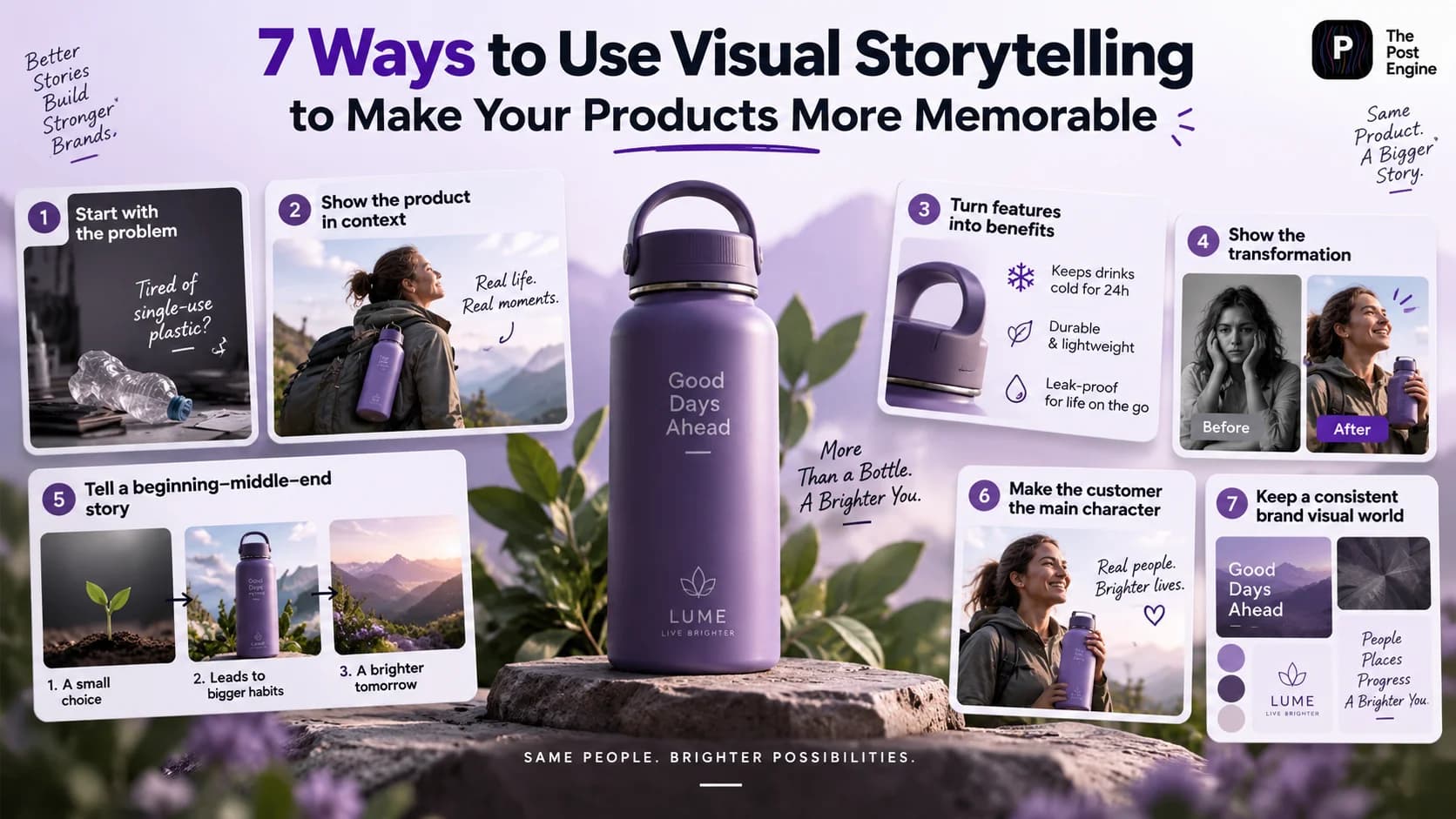
Learn 7 practical ways to use visual storytelling for product content, from showing products in context to creating transformations, sequences, and memorable brand visuals.
A product photo can show people what you sell.
But visual storytelling can show them why they should care.
Instead of presenting a product as an isolated object, storytelling gives it context: a problem, a person, a situation, or a transformation.
That matters because visual content can communicate a product and its story very quickly, while consistent visual presentation can help create recognition across channels. Shopify's 2026 visual marketing guidance recommends leading with stories, standardizing visual identity, and creating assets with multiple uses in mind.
The better approach is:
Don't just show the product. Show the story around it.
Start With the Problem
One of the easiest ways to make product content more interesting is to start before the product appears.
Show the situation your customer recognizes.
For example:
Messy desk → frustration → product → organized workspace
Or:
Dry skin → skincare routine → product → finished look
The product becomes the solution inside the story, instead of simply being displayed.
This follows a common problem-solution structure used in ecommerce storytelling: establish the customer's situation first, then show how the product fits into it. Shopify — Brand Storytelling Examples
Best combination:
Problem + Product + Result
IMAGE 2 — PROBLEM TO SOLUTION
Show the Product in Context
A product on a plain background tells people what it looks like.
A product in a real situation tells people how they might use it.
For example:
Backpack → commuter → train station
Coffee machine → morning routine → finished coffee
Desk lamp → workspace → evening work
This makes the product easier to imagine in everyday life.
Product videos and demonstrations can be especially useful for ecommerce because customers cannot physically interact with a product before purchasing. HubSpot — Why Product Videos Matter for Ecommerce
Best combination:
Product + Person + Real Situation
IMAGE 3 — PRODUCT IN CONTEXT
Turn Features Into Visual Benefits
Don't make your visual content look like a product specification sheet.
Instead of:
Water-resistant material
show:
The product being used in the rain.
Instead of:
Large storage capacity
show:
What fits inside the product.
The formula is simple:
Feature → Situation → Benefit
This lets the visual demonstrate why the feature matters instead of forcing the customer to interpret a list of specifications.
Product demonstrations are also useful for showing how a product works and what customers can expect before buying. HubSpot — Product Videos for Ecommerce
Best combination:
Feature + Visual demonstration + Short benefit
Use Before & After Storytelling
Before-and-after content works because the change becomes the story.
Use:
Before → After
or:
Problem → Process → Result
This can work for:
Beauty products
Home products
Fashion
Fitness
Software
Design tools
For example:
Before: Empty roomAfter: Finished room
Or:
Before: Basic product photoAfter: Lifestyle campaign image
The difference should be obvious enough to understand without reading a long explanation.
IMAGE 4 — BEFORE & AFTER
Create a Beginning, Middle, and End
A product story doesn't always need to fit into one image.
You can build a simple sequence:
Beginning: What's the problem?
Middle: How does the product help?
End: What changes?
This works particularly well for:
Carousels
Reels
TikTok slideshows
Product videos
Multi-post campaigns
For example:
Slide 1: “Your desk always looks like this?”Slide 2: Introduce the productSlide 3: Show it being usedSlide 4: Show the resultSlide 5: CTA
Episodic storytelling can also help create continuity between posts instead of treating every piece of content as a completely separate promotion. Sprout Social — Social Media Storytelling
Best combination:
Problem → Solution → Result → CTA
IMAGE 5 — VISUAL STORY SEQUENCE
Make the Customer the Main Character
Your product doesn't always need to be the hero.
Sometimes the better story is about the customer.
Instead of:
“Our new running shoes are lightweight.”
Try:
“She wanted to run her first 10K.”
Then the story becomes:
Goal → Challenge → Product → Progress
This makes the product part of a larger experience.
The same approach can work for almost any category:
Beauty: getting ready for an eventFashion: preparing for a tripFitness: reaching a personal goalSoftware: saving time on a taskFood: creating a better meal
The strongest stories often connect a product to a recognizable customer situation rather than focusing exclusively on the product itself. Shopify — Brand Storytelling Examples
Build a Consistent Visual World
One memorable image is useful.
A recognizable visual identity is even more valuable.
Keep recurring elements across your product content:
ColorsTypographyLightingBackgroundsCompositionPhotography style
For example, a premium skincare brand might consistently use:
Soft lighting + neutral backgrounds + close-up product shots + minimal typography
Over time, those choices become part of the brand's visual language.
Shopify recommends developing a consistent visual identity and creating assets that can be reused across different marketing channels. Shopify — Visual Marketing
IMAGE 6 — VISUAL BRAND CONSISTENCY
Create Product Stories With The Post Engine
The difficult part isn't always finding the story.
It is turning that story into enough quality content to publish consistently.
With The Post Engine, you can start from a product and create different creative directions around the same asset.
For example:
One product image
↓
Lifestyle post
↓
Feature-focused creative
↓
Before & After
↓
Promotional post
↓
Carousel
This makes visual storytelling more practical because one product doesn't have to produce only one piece of content.
You can also take this concept further with How to Turn One Product Photo Into 5 Social Media Posts and explore how a single product asset can become multiple social creatives.
IMAGE 7 — THE POST ENGINE
Frequently Asked Questions
What is visual storytelling for products?
Visual storytelling uses images, video, design, and sequence to communicate what a product does, how it is used, and why it matters.
Does visual storytelling work for ecommerce?
Yes. Product demonstrations, lifestyle visuals, tutorials, and other visual formats can help online shoppers better understand products they cannot physically examine before buying. HubSpot — Product Videos for Ecommerce
Do I need video to use visual storytelling?
No.
You can tell a story with:
One image → Carousel → Before & After → Infographic → Short video
How can I create more product stories?
Start with one product and ask:
What problem does it solve?Who uses it?Where is it used?What changes after using it?What makes it different?
Each answer can become a different visual concept.
Final Takeaway
Memorable product content isn't about showing more information.
It's about showing the right story.
Use:
Problem to create relevance.Context to show how the product fits into life.Benefits to explain why it matters.Before & After to show transformation.Sequences to build a complete story.Customers to make the content relatable.Consistency to make the brand recognizable.
The process becomes:
Product → Story → Visual concept → Social creative → Publish
A strong product visual doesn't simply show people what you sell.
It helps them remember why they would want it.