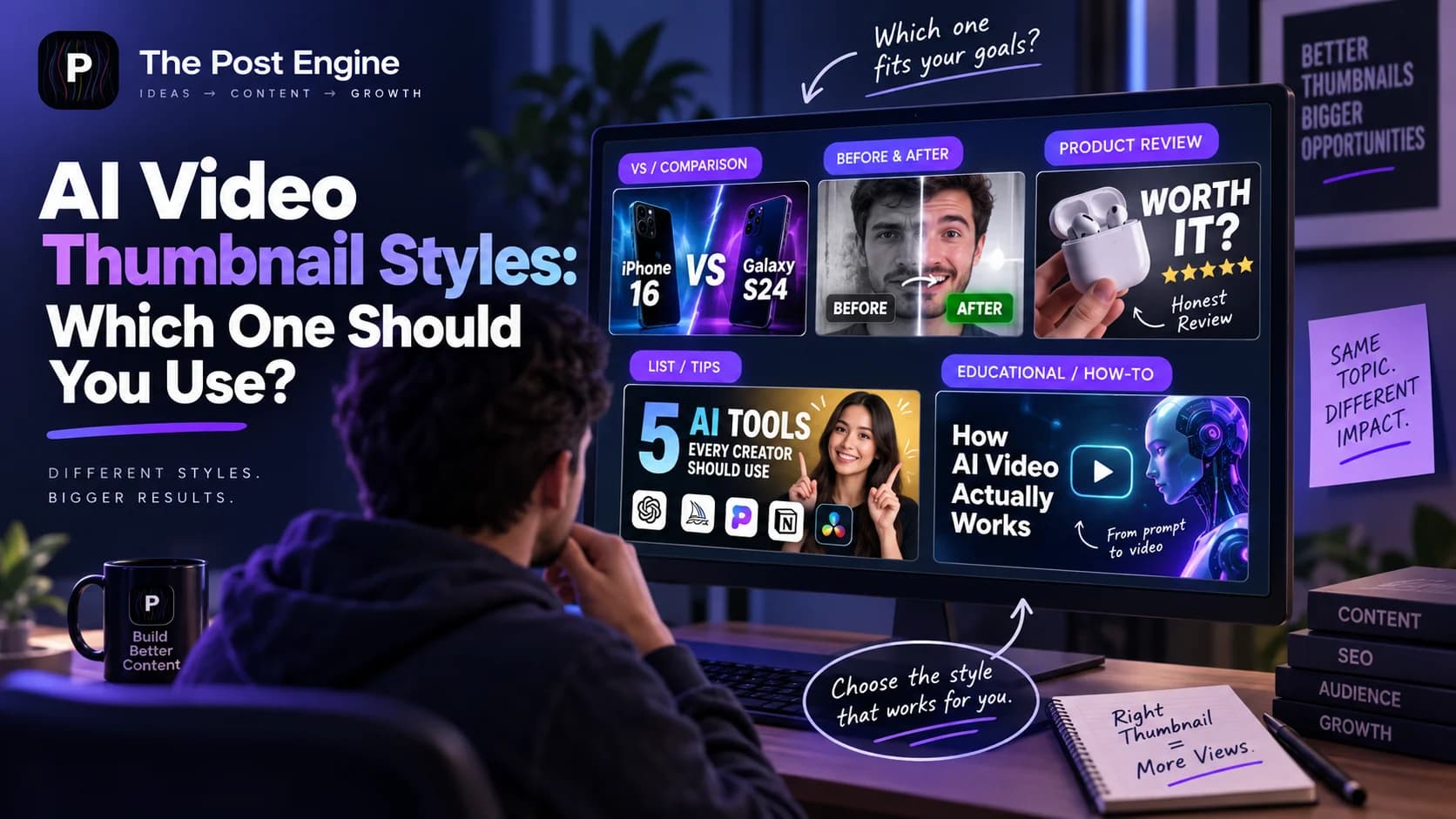
Learn which AI video thumbnail style to use for comparisons, reviews, before-and-after videos, list videos, and general content. Discover how emotion, lighting, and composition affect thumbnail performance.
A thumbnail can determine whether someone notices your video or scrolls past it.
But not every video needs the same thumbnail.
A comparison video should communicate two sides.
A product review should make the product immediately recognizable.
A transformation video should make the change obvious.
A list video should communicate what viewers are going to get.
That is why choosing a thumbnail style before creating the design can be more useful than simply asking AI to “make an eye-catching thumbnail.”
YouTube describes thumbnails and titles as important parts of how viewers decide what to watch, and says 90% of its best-performing videos have custom thumbnails. It also recommends keeping thumbnails simple, readable, and representative of the video's actual content. YouTube — Thumbnail & Title Tips
The better approach is:
Choose the thumbnail concept first. Then use AI to execute it.
Why Thumbnail Style Should Match the Video
The biggest mistake is choosing a thumbnail based only on what looks attractive.
A thumbnail needs to communicate the idea of the video quickly.
For example, imagine these three titles:
“ChatGPT vs Claude: Which Is Better?”
“I Used This AI Tool for 30 Days”
“7 AI Tools Every Creator Should Know”
Using the same thumbnail structure for all three would waste an opportunity.
The first needs comparison.
The second needs experience or a result.
The third needs a clear list or benefit.
This is what YouTube calls packaging: your title and thumbnail work together to communicate value and set expectations. YouTube also provides A/B testing for eligible creators so different thumbnail and title combinations can be compared using watch-time performance. YouTube — Test & Compare Thumbnails and Titles
So instead of asking:
“What is the best thumbnail style?”
ask:
“What is the best style for this particular video?”
General Thumbnails: Best for Broad Topics
The General style works well when the video has one clear central idea but doesn't fit a stronger specialized category.
Examples include:
Tutorials
Commentary
Educational videos
News or updates
Explainers
Opinion videos
Creator content
The structure can be simple:
One subject + one visual idea + short text
For example:
“I Tried AI for 30 Days”
The thumbnail could show:
Creator + AI interface + “30 DAYS”
The key is not adding everything from the video.
Choose the single idea that makes someone want to know more.
YouTube recommends avoiding overly complex thumbnail designs and making sure the image remains clear across different devices. YouTube — Thumbnail & Title Tips
Best combination:
General + clear subject + readable text + simple composition
For creators managing a larger content library, this is also where a repeatable thumbnail system becomes useful. You can use The Post Engine's Video Thumbnail workflow to create a consistent starting point for different videos instead of redesigning every thumbnail from scratch.
VS / Comparison Thumbnails: Show the Difference
Comparison videos need the viewer to understand the comparison immediately.
For:
“ChatGPT vs Claude: Which Is Better?”
a useful structure is:
Option A | VS | Option B
You can use:
Two products
Two people
Two tools
Two strategies
Two results
The thumbnail should make the contrast obvious before the viewer reads the title.
Useful techniques
Split composition
Place the two subjects on opposite sides.
Visual contrast
Make the differences visible through position, size, or background.
Minimal text
The title already explains the comparison.
Don't overload the thumbnail with:
“THE ULTIMATE COMPARISON OF THE BEST AI TOOLS IN 2026”
Instead, something as simple as:
VS
may be enough when the two subjects are recognizable.
Best combination:
VS/Comparison + two clear subjects + strong separation + minimal text
If you regularly publish comparison videos, your past channel performance can help you decide whether product-led, face-led, or split-screen thumbnails work better. A YouTube Channel Analysis workflow can be used here to turn previous thumbnail patterns into a reference for the next round of designs.
Before & After: Make the Transformation Obvious
Before-and-after thumbnails work when the change itself is the story.
Examples:
“I Redesigned My Website”
“From Empty Room to Modern Office”
“My Thumbnail Before vs After”
The thumbnail should make the transformation understandable immediately.
Use:
Before | After
or
Old state → New state
The biggest mistake is making both sides look too similar.
The viewer should instantly understand:
Something changed.
You can strengthen the difference through:
Position
Scale
Lighting
Color
Background
Facial expression
Visual labels
But don't exaggerate the transformation beyond what the video actually shows.
YouTube warns against thumbnails that misrepresent the video's content. YouTube — Thumbnail & Title Tips
Best combination:
Before & After + obvious contrast + simple labels + visible result
When the concept is right but one generated element needs adjustment, creative revisions in The Post Engine can be used as the refinement stage rather than rebuilding the whole concept.
Product / Review: Put the Subject First
For product reviews, the product is usually the most important visual element.
If the video is:
“I Tested the New Camera”
the audience should be able to identify the product immediately.
For:
“Is This $500 Camera Worth It?”
the thumbnail can show:
Product + result + reviewer reaction
The important question is:
What does the viewer need to know before deciding whether to watch the review?
You can focus on:
Product appearance
Key feature
Result
Reaction
Problem
Comparison point
Avoid turning the thumbnail into a product catalog.
One strong product image is often more useful than showing five small features.
Best combination:
Product/Review + recognizable product + one key benefit or reaction + clean background
This is especially useful when the product itself must remain accurate across multiple creatives. Using reference images in The Post Engine's Video Thumbnail workflow can give the generation process a real product reference instead of relying on a generic description. The Post Engine — Video Thumbnail
IMAGE 2 — THUMBNAIL STYLES
List / Tips: Make the Promise Clear
List and educational videos work best when the viewer understands the benefit quickly.
Examples:
“7 AI Tools Every Creator Should Know”
“5 Ways to Grow on Instagram”
“10 Editing Mistakes to Avoid”
Instead of putting the entire title on the thumbnail, extract the key promise.
For example:
TITLE:7 AI Tools Every Creator Should Know
THUMBNAIL:7 AI TOOLS
The thumbnail supports the title instead of copying it.
A 2026 vidIQ analysis of 500 breakout YouTube thumbnails found that 72% used overlay text, with a median of five words among thumbnails using text. The same study found that high-performing thumbnails generally used simple visual ideas rather than overcrowding the frame. These are patterns from one sample, not universal rules. vidIQ — YouTube Thumbnail Study 2026
Best combination:
List/Tips + number or benefit + short text + one strong visual
When you need to turn a thumbnail concept into a broader campaign, you can also adapt the same content idea into other social formats through The Post Engine AI Content Studio rather than treating the thumbnail as an isolated asset.
Use Emotion Without Overdoing It
Emotion can help communicate the story quickly.
Useful emotional directions include:
Shocked
Excited
Intense
Confused
Happy
But emotion shouldn't become decoration.
The expression should match the video.
For example:
“I Lost $1,000 Testing This”
A surprised or concerned expression makes sense.
But:
“How to Export a CSV File”
probably doesn't need an exaggerated shocked face.
The 2026 vidIQ thumbnail analysis found that only 5% of the 500 breakout thumbnails studied used exaggerated expressions, while human faces appeared in 69% of the full sample. The takeaway is not that faces are mandatory, but that expressions work best when they actually communicate something relevant. vidIQ — YouTube Thumbnail Study 2026
Best combination:
Relevant emotion + clear subject + expression that supports the story
Your thumbnail can still use different emotions while keeping a recognizable visual language. A consistent Brand DNA system can help keep that broader brand direction stable across changing thumbnail concepts.
Choose the Right Lighting and Composition
Once you've chosen the thumbnail type, the next decisions are visual.
Your lighting and composition should support the idea rather than compete with it.
Clean & Bright
Useful for:
Tutorials
Technology
Product demonstrations
Educational videos
Soft Natural
Useful for:
Lifestyle
Travel
Personal content
Everyday situations
Dark & Dramatic
Useful for:
Mystery
Challenges
Serious topics
High-tension stories
Luxury
Useful for:
Premium products
High-end reviews
Fashion
Business content
Warm
Useful for:
Food
Lifestyle
Travel
Personal storytelling
High Contrast
Useful when the subject needs to stand out quickly.
Professional Studio
Useful for:
Product reviews
Tutorials
Technology
Business content
YouTube recommends considering composition and techniques such as the rule of thirds while keeping the design simple enough to remain understandable on different devices. YouTube — Thumbnail & Title Tips
Once you've chosen the lighting, composition, and subject position, The Post Engine Video Thumbnail workflow can be used to turn that direction into a finished visual.
The goal isn't to combine every visual effect.
Choose one visual direction that supports the video's promise.
IMAGE 3 — STYLE DECISION GUIDE
Test Different Thumbnail Concepts
Even a well-designed thumbnail is still a hypothesis.
Eligible YouTube creators can currently A/B test up to three different titles and thumbnails, with the winning combination determined by watch time rather than simply clicks. YouTube — Test & Compare Thumbnails and Titles
That changes how you should think about thumbnail styles.
Instead of asking:
“Which style is universally best?”
test:
General vs. Product/Review
or:
Before & After vs. General
or:
Face-focused vs. Product-focused
YouTube also recommends looking at impressions and CTR together with context because CTR can vary depending on where viewers discover the video. YouTube — Decoding CTR & Impressions
A useful testing process is:
Choose a video
↓
Create 2–3 thumbnail concepts
↓
Keep the core promise consistent
↓
Test
↓
Measure
↓
Use the result to inform future thumbnails
You can use The Post Engine's YouTube Channel Analysis to look for recurring patterns across your channel before deciding what type of thumbnail to test next.
The goal isn't to find one permanent style.
It's to discover which visual packaging works for your audience and your type of video.
Build Video Thumbnails With The Post Engine
Choosing the right style is the creative decision.
The next step is turning that decision into a finished thumbnail.
The Post Engine's Video Thumbnail workflow lets you define the creative direction using options such as:
Thumbnail type
General
→ VS / Comparison
→ Before & After
→ Product / Review
→ List / Tips
Emotion
Shocked
→ Excited
→ Intense
→ Confused
→ Happy
Lighting
Clean & Bright
→ Soft Natural
→ Dark & Dramatic
→ Luxury
→ Warm
→ High Contrast
→ Professional Studio
You can also use reference images and subject positioning to give the generation a clearer visual direction.
That means the process becomes:
Video idea
↓
Choose thumbnail style
↓
Select emotion
↓
Choose lighting
↓
Add reference image
↓
Set composition
↓
Generate
↓
Revise
↓
Test
Instead of asking AI to:
“Make a clickable thumbnail.”
you're giving it a specific creative recipe based on the video.
For example:
Product review
Product / Review
Excited
Clean & Bright
Product reference
Product as main subject
Or:
Comparison
VS / Comparison
Intense
High Contrast
Two reference images
One subject on each side
Or:
Transformation
Before & After
Shocked
High Contrast
Before + after references
The The Post Engine Video Thumbnail workflow can therefore be used at different points in the process: creating the initial concept, refining the visual, and preparing variations for testing.
The advantage isn't simply generating thumbnails faster.
It's making the creative decision before generation.
IMAGE 4 — POST ENGINE VIDEO THUMBNAIL
Frequently Asked Questions
Which thumbnail style is best?
There isn't one style that works for every video. Choose the style that communicates the video's main promise most clearly.
Should every thumbnail contain text?
No. Text can help communicate the idea, but a strong visual may be enough. YouTube recommends keeping thumbnail text readable and the overall design simple. YouTube — Thumbnail & Title Tips
Are emotional faces necessary?
No. Faces can help when the expression supports the story, but they aren't required. Recent third-party research found that exaggerated expressions were relatively uncommon among the breakout thumbnails it studied. vidIQ — YouTube Thumbnail Study 2026
Should I use the same thumbnail style for every video?
A recognizable brand style can help, but the thumbnail should still communicate the specific video. Comparison, review, tutorial, and transformation videos often need different visual approaches.
Can I test different thumbnails?
Yes. Eligible YouTube creators can currently A/B test up to three title and thumbnail combinations through YouTube Studio. The platform selects the winning combination based on watch time. YouTube — Test & Compare Thumbnails and Titles
Final Takeaway
There is no universally perfect AI video thumbnail style.
The best choice depends on what the viewer needs to understand before clicking.
Use:
General for broad topics.
VS / Comparison when two things need to be compared.
Before & After when transformation is the story.
Product / Review when the product is the subject.
List / Tips when the value is a number, list, or collection of ideas.
Then choose the emotion, lighting, composition, reference images, and subject position that support that concept.
The process becomes:
Video idea → Thumbnail style → Visual direction → Generate → Test → Learn
A strong thumbnail isn't simply attractive.
It makes the video's value understandable before the viewer presses play.