Learn how to turn static product images into dynamic AI videos for social ads. Discover product animation ideas, video structures, ad formats, and ways to create more engaging ecommerce creatives.
A product photo can show people what you sell.
But a product video can show them how it works, how it looks in use, and why it matters.
Many ecommerce brands already have product photography but need more video creative for TikTok, Instagram Reels, Facebook, and YouTube Shorts.
AI makes it easier to get more value from those existing assets. Google Ads, for example, offers AI-powered video enhancements that can adapt existing video assets into additional formats, while TikTok recommends recutting existing creative into vertical, platform-native versions. Google Ads — About Video Enhancements TikTok for Business — Creating Made Easier
The better approach is:
Don't create every product video from scratch. Turn the images you already have into new video concepts.
Why Turn Product Images Into Video?
A static product image is useful.
But video gives you more ways to communicate the product.
You can show:
Movement
Product details
Different angles
Product usage
Transformation
Benefits
Text and sound
The advantage is that you can start with an asset you already have instead of producing an entirely new photo shoot for every campaign.
TikTok specifically recommends repurposing existing creative assets and adapting them into vertical, native-looking content rather than starting from zero every time. TikTok for Business — Creating Made Easier
One product photo can therefore become the starting point for several video concepts.
Best combination:
Product image + motion + message + CTA
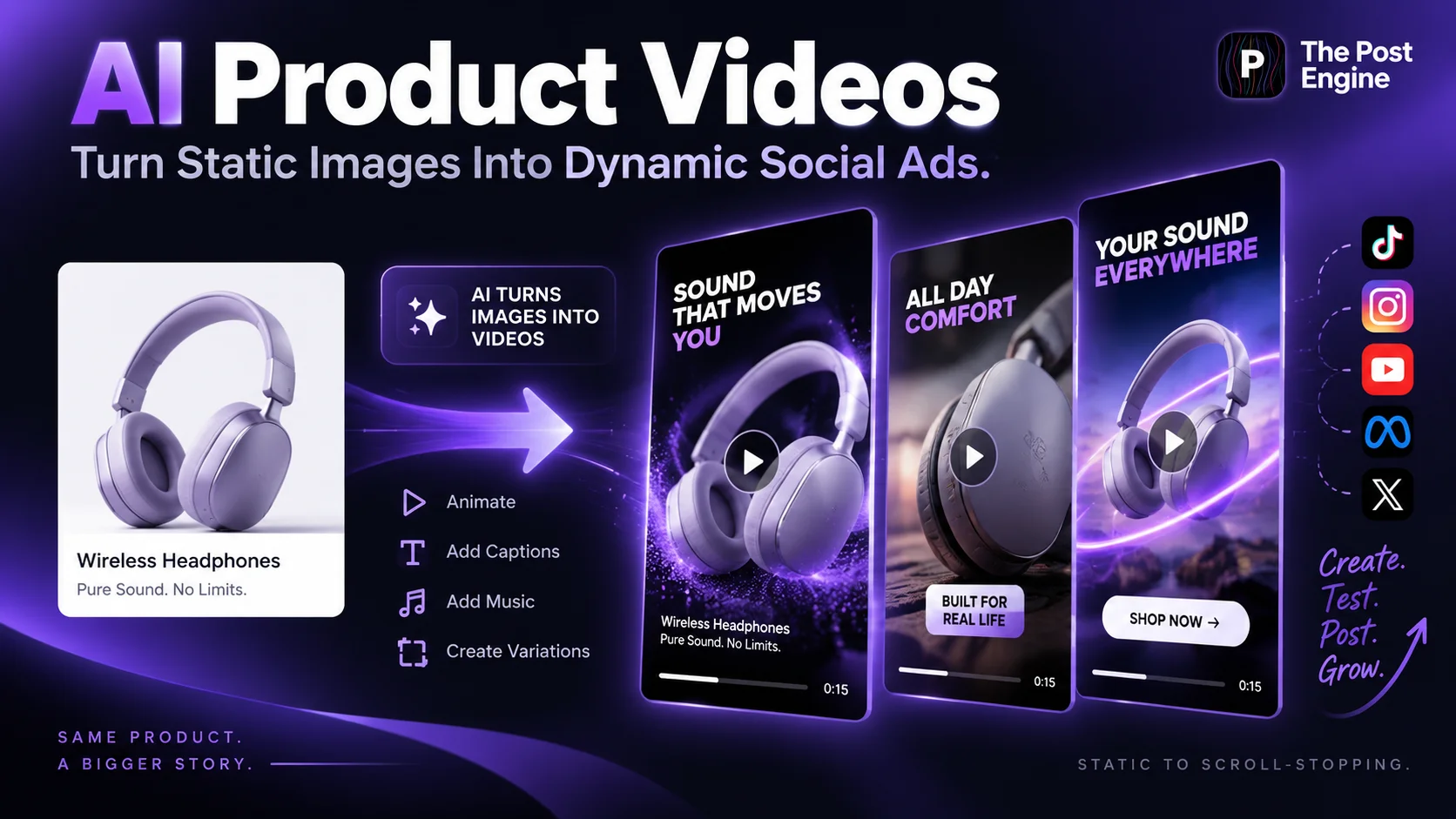
Add Motion to Static Product Photos
The simplest AI product video starts with a single image.
Instead of leaving the product completely static, introduce controlled movement.
For example:
Slow camera push-in
Product rotation
Background movement
Light passing across the product
Product entering the frame
Subtle environmental movement
The goal isn't to add movement everywhere.
The product should remain the visual focus.
A useful rule is:
Motion should make the product more interesting, not harder to understand.
TikTok's creative guidance encourages dynamic editing and movement while keeping the core message easy to follow. TikTok Creative Codes — 6 Principles for Creating Effective Ads
Best combination:
Product image + subtle movement + clear focal point
IMAGE 2 — STATIC TO MOTION
Turn Product Features Into Video Stories
Don't use video only to make the product move.
Use it to demonstrate why the product matters.
For example:
Feature: Water-resistant
Video:
Product → Rain → Water rolls off → “Ready for rainy days”
Or:
Feature: Large storage capacity
Video:
Empty bag → Items added → Organized bag → “More space, less mess”
The formula is:
Feature → Demonstration → Benefit
This is often stronger than putting the feature on screen and expecting the viewer to imagine the result.
Shopify recommends product demonstrations to show how products work, highlight benefits, and help customers understand real-world applications. Shopify — Product Demos: Guide, Steps, and Examples
Best combination:
Feature + Demonstration + Benefit
Show Products in Real-Life Situations
A product photo shows the object.
A product video can show the experience around the object.
For example:
Skincare → Person applying the product
Headphones → Person using them during a commute
Coffee machine → Morning kitchen scene
Watch → Person wearing it at work
This makes it easier for potential customers to imagine using the product themselves.
Shopify recommends product demonstration videos because they can show customers how a product works and how it can fit into real-life situations. Shopify — Product Demo Video: How To Make One With Examples
The idea doesn't need to be cinematic.
It can be as simple as:
Product + Person + Situation
IMAGE 3 — PRODUCT IN USE
Use Before & After Video Concepts
Before-and-after storytelling works especially well when the product creates a visible change.
A simple structure is:
Before
↓
Product
↓
Transformation
↓
After
For example:
Empty room → Product appears → Room transformation → Finished space
Or:
Messy desk → Organization product → Product in use → Clean desk
The viewer can understand the story through the visuals without needing a long explanation.
This format can work particularly well for home products, beauty, fashion, organization, creative tools, and software.
The important point is to make the change clear without making unrealistic claims about what the product can achieve.
Best combination:
Before + Product + Transformation + Result
IMAGE 4 — BEFORE & AFTER
Build Short Product Ad Structures
A product video doesn't need to be long to communicate its message.
A simple short-form structure is:
0–2 sec: Hook
2–5 sec: Product reveal
5–8 sec: Benefit or demonstration
8–12 sec: Result
12–15 sec: CTA
For example:
“Still dealing with messy cables?”
↓
Product appears
↓
Show the cable organizer in use
↓
Show the cleaner desk
↓
“Organize your setup.”
TikTok's creative framework recommends thinking in three stages: Hook → Body → Close. The hook grabs attention, the body communicates the value, and the close delivers the CTA. TikTok Creative Codes — 6 Principles for Creating Effective Ads
The exact timing can change depending on the product and platform.
The principle stays the same:
Give people a reason to keep watching immediately.
IMAGE 5 — VIDEO AD STRUCTURE
Optimize AI Product Videos for Social Ads
Turning an image into video is only the first step.
The final creative also needs to fit the platform where people will see it.
For mobile-first placements, vertical video is especially important. TikTok's creative guidance recommends 9:16, 720p or higher, sound, and keeping important elements within the safe zone. TikTok Creative Codes — 6 Principles for Creating Effective Ads
For YouTube Shorts, Google also recommends vertical, social-first creative designed for the Shorts environment. Google Ads — YouTube Shorts Ads: Asset Specs and Best Practices
Pay attention to:
Vertical 9:16 framing
Clear product visibility
Readable text
Short messaging
Safe zones
Strong opening frame
Clear CTA
Also avoid filling the frame with too many messages.
One product.
One main idea.
One clear action.
Best combination:
9:16 + clear product + short message + CTA
IMAGE 6 — SOCIAL VIDEO FORMAT
Create Multiple Video Concepts From One Image
You don't have to create only one video from a product photo.
Try different creative directions.
Concept 1 — Product Showcase
Product animation + benefit + CTA
Concept 2 — Lifestyle
Product + customer + real-world situation
Concept 3 — Problem / Solution
Problem → Product → Result
Concept 4 — Before / After
Before → Product → Transformation
Concept 5 — Feature Demo
Feature → Demonstration → Benefit
The product image stays the same.
The story changes.
This gives you more opportunities to discover which creative direction works best for your audience.
TikTok recommends creating diverse versions of creative, while Google Ads also supports adapting existing video assets into additional formats and orientations. TikTok for Business — Creating Made Easier Google Ads — About Video Enhancements
The goal isn't:
“Which AI video looks coolest?”
It's:
“Which video communicates the product's value most clearly?”
IMAGE 7 — MULTIPLE CONCEPTS
Create AI Product Videos With The Post Engine
The real advantage of AI product videos isn't simply generating motion.
It's getting more creative value from the product content you already have.
With The Post Engine, you can use existing product content as a starting point for social creatives and develop different content variations around the same product.
A simple process can look like:
Product image
↓
Choose video concept
↓
Define visual direction
↓
Create video
↓
Add message + CTA
↓
Create variations
↓
Publish and test
For example, one product image could become:
Product showcase
Feature demonstration
Lifestyle video
Problem/solution ad
Promotional video
This gives brands another way to reuse product photography instead of treating every new video as a completely separate production project.
You can also connect this article with your existing article:
How to Turn One Product Photo Into 5 Social Media Posts
That gives readers another practical way to get more content from the same product asset.
IMAGE 8 — THE POST ENGINE
Frequently Asked Questions
What is an AI product video?
An AI product video uses artificial intelligence to create or animate product-focused video content, often starting with product images, descriptions, or existing creative assets.
Can AI turn one product image into a video?
Yes. AI-powered tools can animate static product images and generate movement or new video scenes. Google also provides AI-powered video enhancement features for adapting existing assets. Google Ads — About Video Enhancements
What products work well for AI product videos?
Almost any visually clear product can work, including:
Beauty
Fashion
Electronics
Food
Home products
Accessories
Digital products
The clearer the original product image, the better the starting point for a product-focused concept.
Should AI product videos be vertical?
For mobile-first placements such as TikTok and YouTube Shorts, vertical 9:16 is the preferred format. TikTok recommends 9:16 creative, while Google recommends vertical assets for Shorts.
→TikTok Creative Codes — 6 Principles for Creating Effective Ads
→Google Ads — YouTube Shorts Ads: Asset Specs and Best Practices
Should every product image become a video?
No.
Use video when motion, demonstration, context, or a sequence adds something that a static image cannot communicate as effectively.
Final Takeaway
Your product photography doesn't have to remain static.
One product image can become:
Product animation
Lifestyle video
Feature demonstration
Problem/solution ad
Before & After
Promotional video
The process becomes:
Static image → Video concept → Motion → Message → CTA → Test
AI product videos aren't about replacing good product photography.
They're about getting more creative value from the product assets you already have.