Learn how to build a practical social media workflow that moves content from idea to approved, scheduled, published, and improved—without unnecessary manual work.
What Is a Social Media Workflow?
A social media workflow is the repeatable process you use to move content from an idea to a published post—and then use the result to make the next post better.
The important part is not having a separate tool for every stage. It is making sure the information, decisions, and assets move cleanly from one step to the next.
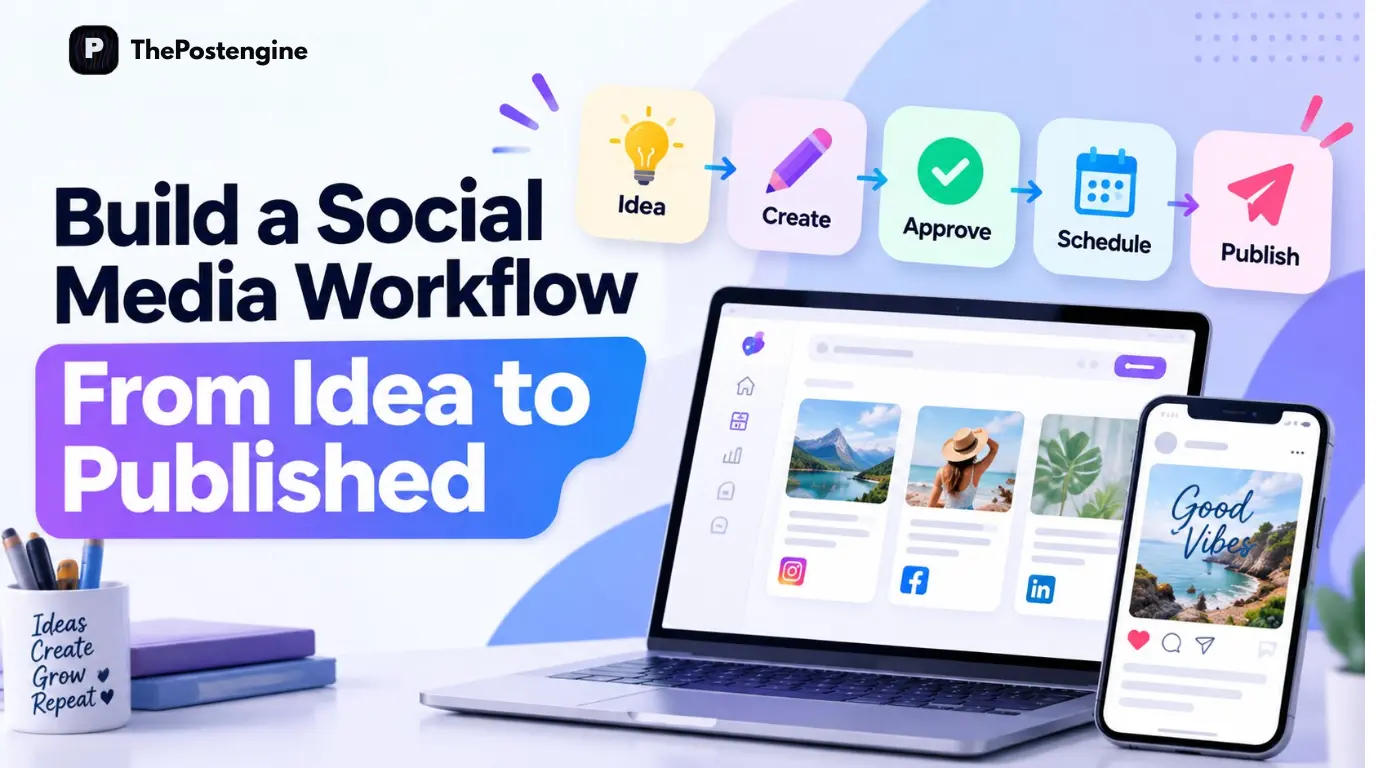
A practical workflow looks like this:
1.Idea
2.Strategy
3.Create
4.Review
5.Adapt
6.Schedule
7.Publish
8.Learn
A small business may handle every stage itself. A larger team may split planning, creation, approval, and publishing between several people. Either way, the same principle applies: every step should leave the next step enough context to continue without starting over.
A documented workflow also makes the process easier to manage. You can see what is waiting for approval, what is ready to publish, and what still needs work. That reduces the “what should I post today?” problem and replaces it with a predictable operating system for content.
The 7-Step Workflow From Idea to Published Post
Step 1: Start With a Strong Content Idea
Don't begin by opening your design tool. Start with the reason the post should exist.
Strong ideas usually come from a customer problem, a content gap, a product or offer, or a topic/format that has already shown demand.
For example, instead of:
“We need to post something today.”
start with:
“Our customers keep asking how to choose between these two products.”
Now the post has a purpose. That purpose gives you a clearer audience, a useful angle, and a measurable goal. It also gives the creator a better starting point than a blank page.
Use your content system, not random inspiration
Your ideas should fit into broader content themes such as education, product, trust, engagement, promotion, and behind the scenes. This helps you balance your calendar and avoid publishing five variations of the same message.
A content system also makes batching easier because you can decide the week’s themes first, then create the individual assets around them.
Step 2: Add Brand and Audience Context
A good idea can still become a weak post if the message does not sound like your brand or speak to the right customer.
Before creation, define five things:
Who is this for?
What problem are we solving?
What do we want the reader to do?
How should the post sound?
What makes our perspective different?
This context improves both human and AI-assisted creation because the writer or tool has a clear brief to work from.
The Post Engine’s Brand DNA can act as a reusable foundation for brand tone, audience, positioning, offers, and content style, so teams do not have to rebuild the same context for every post.
The practical rule is simple: give the creator enough information to understand the business before asking for content. Better context upstream usually means less rewriting downstream.
Step 3: Create the Post
Now turn the idea into the asset that best matches the objective. Depending on the goal, that may be a social post, caption, product creative, thumbnail, short-form video, or UGC video.
Do not create every format every time. Choose the format that makes the idea easiest to understand and most likely to achieve the intended action.
The Post Engine’s Posts workspace can organize the content pipeline, while Studio supports content creation and UGC-related workflows. This matters because creation should happen inside the workflow—not in a disconnected step that someone later has to rebuild for publishing.
Explore The Post Engine Studio for content creation and creative production.
Keep creation separate from publishing
You do not need to publish the moment a post is created.
Create first. Review it. Then schedule it. That separation gives you more control over quality, consistency, and timing.

Related : AI Social Media Content: The Complete Guide to Better Content at Scale
Step 4: Review and Refine
The first draft is a starting point, not automatically the final post. Before scheduling, check the message, brand voice, creative, hook, CTA, and accuracy.
Message: Is the main idea obvious within a few seconds?
Brand voice: Does it sound like your business rather than a generic template?
Creative: Does the visual reinforce the message?
Hook: Would the opening earn enough attention to continue?
CTA: Does the reader know what to do next?
Accuracy: Are the claims, product details, and links correct?
For teams using AI, this review is especially important. Faster generation only helps when the quality gate stays in place.
A good workflow should also support refinement without forcing the team to rebuild the entire asset. Small changes to the hook, visual, caption, tone, or creative direction can be more efficient than starting from zero.
Step 5: Choose Where to Publish
One strategic idea can often become multiple platform-native versions, but the packaging should change with the platform.
Instagram: Lead with the visual, hook, carousel, or Reel format.
LinkedIn: Add more context, expertise, or a business lesson.
Pinterest: Use searchable, visual content with a clear headline.
YouTube: Turn the idea into short-form or long-form video when the topic supports deeper explanation.
Avoid automatically publishing identical content everywhere. Keep the strategic idea consistent, but adapt the hook, format, depth, visual treatment, and CTA to the platform.
Match the content to the platform
The goal is not to create four unrelated campaigns. It is to create one useful idea and package it in ways that feel native to the channels where your audience spends time.
Adapt format and message
A workflow becomes more efficient when adaptation happens before scheduling, so the calendar contains approved platform-specific versions rather than a single generic post copied everywhere.
Related : Best Times to Post on Instagram, Facebook, YouTube & Pinterest
Step 6: Schedule the Post
Once content is approved, scheduling removes the need to remember every publishing task manually. Your workflow should answer four questions: where is this going, when will it go live, is it approved, and what content comes before or after it?
The Post Engine’s scheduling workflow is designed to support this handoff between creation and publishing. You can organize approved content in advance instead of treating each post as a last-minute task.

Choose the date and time
Choose timing based on your audience, campaign cadence, and platform needs. The exact “best time” is less important than having a schedule your team can consistently execute and improve from performance data.
Organize your publishing calendar
A useful calendar shows what is planned, what is ready, and what still needs approval. That visibility helps prevent gaps, accidental repetition, and last-minute publishing.
Step 7: Publish and Learn
Publishing is not the end of the workflow. It is the beginning of the next cycle.
After a post goes live, review the signals that match your objective. That may include engagement, saves, shares, comments, clicks, reach, watch time, or other meaningful actions.
Do not treat every metric as equally important. A post with fewer likes but strong saves or clicks may have been more valuable than a high-reach post that produced little action.
Then turn the result into a decision: repeat the angle, change the hook, improve the creative, test another format, or retire the idea. This is how a content workflow becomes a learning system instead of a publishing checklist.
How The Post Engine Connects the Workflow
The value of a workflow comes from the connections between its stages. The Post Engine brings several parts of that process into one workspace:
Dashboard: Manage the broader workspace.
Posts: Organize drafts, written content, thumbnails, UGC videos, queued content, and published posts.
Studio: Create social content and creative assets.
UGC: Develop UGC-oriented content workflows.
Brands: Maintain reusable brand context.
Competitors: Analyze competitor patterns and content opportunities.
The product also shows a Full Automation layer as “Coming Soon,” so it should not be described as a currently available feature.
The broader principle is simple: the workflow is more useful when creation, approval, scheduling, publishing, and learning stay connected.

A Simple Workflow You Can Repeat Every Week
Monday — Plan: Choose the week’s topics and goals.
Tuesday — Create: Generate posts, visuals, videos, or UGC.
Wednesday — Review: Refine copy, creative, hooks, and CTAs.
Thursday — Schedule: Put approved content into the calendar.
Friday — Analyze: Review previous content and identify what to repeat or improve.
The exact days do not matter. The system does. The goal is to move from “What should I post today?” to “What is already planned, created, approved, and scheduled?”
A repeatable weekly rhythm also makes batching easier. Once the workflow is stable, you can increase volume without increasing the amount of daily decision-making.
Frequently Asked Questions
What is a social media workflow?
A social media workflow is the repeatable process used to plan, create, review, adapt, schedule, publish, and evaluate social media content.
What is the first step in a social media workflow?
Start with the idea and its purpose. Know who the content is for and what you want it to achieve before creating the asset.
How can I make social media publishing easier?
Batch related tasks, review content before publishing, and use a scheduling system so the team is not manually publishing every post.
Should I create separate content for every platform?
Not necessarily. Start with one strong strategic idea, then adapt the format, message, visual treatment, and CTA for each platform.
Should AI-generated posts be reviewed before publishing?
Yes. Review the accuracy, brand voice, creative, hook, CTA, and overall suitability before publication.
Final Takeaway
A good social media workflow does not make content more complicated. It removes unnecessary decisions and gives every post a clear path from idea to learning.
Use this sequence: Idea → Strategy → Create → Review → Adapt → Schedule → Publish → Learn.
The biggest improvement usually comes from connecting the steps. When your ideas, brand context, creative, approvals, publishing calendar, and performance feedback work together, consistency becomes easier to maintain.
The Post Engine is built around that connected approach, bringing Posts, Studio, UGC, Brands, Competitors, scheduling, and publishing into one workflow.
Ready to build a connected workflow? Start building your content workflow with The Post Engine →