A practical content-repurposing guide for small businesses and e-commerce brands: turn one high-quality product image into five distinct social posts without making your feed feel repetitive.
A single product photo doesn't have to mean a single social media post. With the right content strategy, one high-quality product image can become multiple pieces of content - from product showcases and promotional posts to educational and engagement content.
For small businesses and e-commerce brands, this matters because creating social media content consistently is time-consuming. Instead of designing something completely new every time you need to post, you can repurpose the visual you already have and change the angle, message, format, and purpose.
This guide shows you how to turn one product photo into five different social media posts, what each post should achieve, how to adapt the creative, and how to avoid making every post look like a duplicate.
How Does Content Repurposing Work?
Content repurposing means taking an existing piece of content and adapting it into a new format, message, or use case.
With a product photo, the image itself can stay the same while the story around it changes.
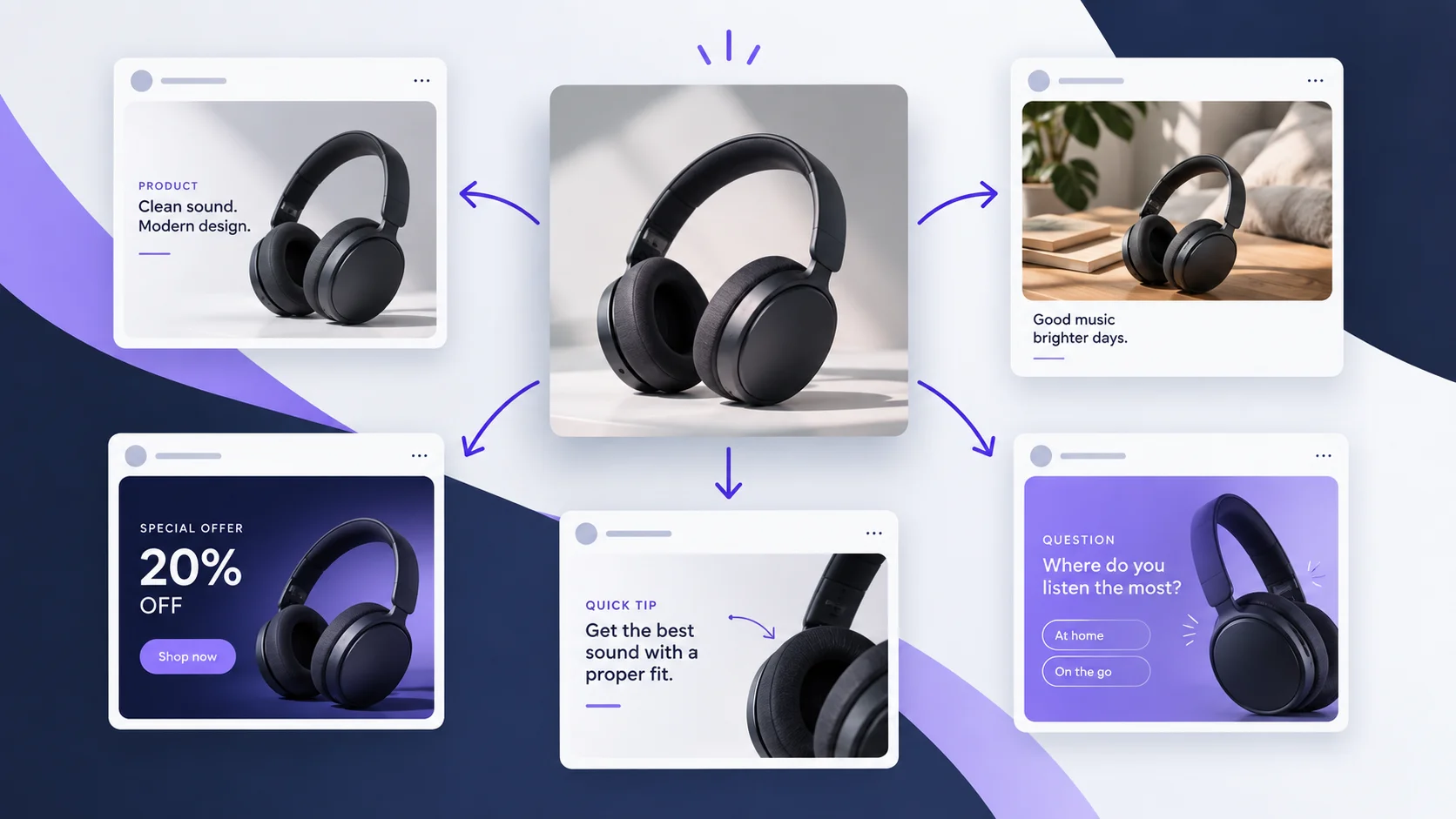
For example, a photo of wireless headphones could become:

The key idea
Repurposing isn't simply posting the same image five times. Each version should give your audience a different reason to pay attention.
Why Should You Turn One Product Photo Into Multiple Posts?
Creating every social media post from scratch takes time. You need to think about:
What should I post?
What image should I use?
What should the headline say?
What caption should I write?
What format should I use?
What CTA should I include?
Repurposing removes some of that work.
The benefits
More content from existing assets: Get more value from photos you've already created.
More creative testing: Test different hooks, messages and CTAs around the same product.
Better consistency: Keep your product visually recognizable across different posts.
Less production time: You don't need to create a completely new concept for every post.
More content variety: Your feed doesn't have to become a stream of identical product promotions.
The 5 Social Media Posts You Can Create From One Product Photo
1. Product Showcase Post
A product showcase is the simplest way to reuse your product photo. The objective is to clearly show what the product is and why someone should care about it.
Example
Product: Wireless headphones
Headline: Meet your new everyday headphones.
Caption: Clear sound, comfortable fit and a battery built for your day. Whether you're working, travelling or relaxing, take your music with you.
Best for
New product launches
Product awareness
Product reminders
E-commerce feeds
Creative tips
Keep the product clearly visible.
Don't cover important product details with text.
Use one strong benefit rather than listing everything.
Add a simple CTA such as Shop Now or Learn More.
2. Lifestyle Post
The second version changes the focus from the product itself to the life of the customer using it.
Shift the question
Instead of asking “What is this product?”, the post answers “How could this product fit into my life?”
Example
Headline: Your commute just got better.
Caption: Block out the noise. Put on your playlist. Make the journey yours.
The product hasn't changed. The context has changed.
Best for
Lifestyle brands
Fashion
Consumer electronics
Beauty
Fitness
Travel products
Creative tip
Show the product in a realistic situation rather than simply placing it on a plain background.
3. Promotional Post
Your third post can focus directly on a sale or special offer. This is where the same product photo becomes a conversion-focused creative.
Example
Headline: SUMMER SALE
Offer: 20% OFF
Supporting text: This weekend only.
CTA: Shop Now
The visual hierarchy should make the most important information immediately obvious:
Product → Offer → Deadline → CTA
Best for
Seasonal promotions
Product launches
Flash sales
Limited-time offers
Clearance campaigns
Creative tip
Don't overload the image with information. A customer should understand the offer within a few seconds.
PROMOTIONAL CREATIVE

4. Educational Post
Your product doesn't always have to be the main message.
You can turn the product into the example used to teach something useful.
Example: 3 Things to Check Before Buying Wireless Headphones
1. Battery Life
Think about how frequently you'll use the headphones and how long you need them to last.
2. Comfort
If you'll wear them for several hours, comfort can be just as important as sound quality.
3. Connectivity
Make sure they work with the devices you actually use.
Your product can then appear naturally as an example.
Why this works
The post provides value before asking the audience to purchase. That makes it different from a traditional promotional post.
5. Engagement Post
The final variation is designed to start a conversation.
Instead of telling your audience about the product, ask them something related to it.
Example
Question: What's Most Important When Choosing Headphones?
Option A: Sound quality
Option B: Battery life
Option C: Comfort
CTA: Comment A, B or C 👇
This gives your audience an easy way to participate.
Best for
Increasing comments
Understanding customer preferences
Starting conversations
Creating interactive content
The answers can also give you useful information for future content.
How to Make Five Posts Feel Different
One of the biggest mistakes in content repurposing is changing only the caption.
If every post has the same image, the same layout, the same headline, and the same CTA, then you're essentially publishing the same post repeatedly.
Instead, change several elements.

How to Create Multiple Variations Faster
Once you have the original product image, you can create variations by changing:
1. The hook
“Meet your new everyday headphones.” versus “Your commute just got better.”
2. The objective
Awareness → Sales → Education → Engagement.
3. The visual context
Product-focused → Lifestyle → Promotional → Informational.
4. The CTA
Shop Now • Learn More • Save This • Comment Below
5. The format
Adapt the creative for different platforms and placements rather than using one identical design everywhere.
One Product Photo → Five Content Opportunities
Here's the complete workflow:
One product photo
↓
Product Showcase
↓
Lifestyle Story
↓
Promotion
↓
Educational Tip
↓
Engagement Question
The result is not five copies of the same post. It's five different content opportunities built around the same product asset.
Common Mistakes When Repurposing Product Content
Repeating the same message
Changing only the caption isn't enough. Change the purpose of the post.
Making every post a sales pitch
Your audience doesn't need five consecutive “Buy Now” posts. Mix promotional content with useful and engaging content.
Adding too much text
The main message should be immediately understandable.
Changing the product
When creating variations, make sure the product itself remains accurate. AI-generated variations can sometimes introduce unwanted changes to product shape, color or details, so the final creative should always be reviewed before publishing.
Forgetting brand consistency
Different posts can have different creative directions while still sharing brand colors, typography, logo treatment, tone of voice and product identity.
A Simple Workflow for E-commerce Brands
If you're managing social media for a product-based business, try this workflow:
Step 1:
Choose one product
Start with an existing high-quality product photo.
Step 2:
Define five objectives
Choose awareness, lifestyle, promotion, education and engagement.
Step 3:
Create a different creative brief for each
Don't ask for five versions of the same design. Give each version a different purpose.
Step 4:
Generate the creatives
Create the appropriate visual and text treatment for each objective.
Step 5:
Check the results
Before publishing, verify product appearance, spelling, pricing, discounts, dates, brand elements, CTA and image quality.
Step 6:
Publish and measure
Compare which angle generates the strongest reach, engagement, clicks, saves and conversions.
How AI Can Help With Content Repurposing
AI can make this workflow significantly faster. Instead of starting every creative from a blank page, you can provide the product, objective and creative direction and generate multiple variations.
But more generation isn't automatically better. The important part is control.
A useful workflow should allow you to control:
What the creative says
How the product appears
The visual direction
The format
The brand style
The CTA
The final text
What makes AI useful
AI-assisted content creation is not simply about generating more images. It is about helping turn one content asset into a complete set of usable creative variations.
Conclusion
You don't always need to create more content from scratch.
Sometimes you need to get more value from the content you already have.
A single product photo can become:
A product showcase for awareness.
A lifestyle post for connection.
A promotional creative for sales.
An educational post for value.
An engagement post for conversation.
The key is to change the purpose, message and creative direction, not simply repost the same image.
For brands that already have a library of product photos, this approach can turn existing assets into a much larger and more varied social media content system.
Frequently Asked Questions
Can I use the same product photo for multiple social media posts?
Yes. The important thing is to change the content angle, message and objective so that each post provides something different.
How many posts can I create from one product photo?
Five is a useful starting point, but there is no fixed limit. You can create additional variations by changing the audience, platform, campaign objective, hook and creative direction.
Should every product post be promotional?
No. Educational, lifestyle and engagement content can help build interest without constantly asking people to buy.
Is content repurposing useful for small businesses?
Yes. It allows small teams to get more value from existing photos and content instead of creating every post from scratch.
Can AI help create these variations?
Yes. AI can help generate different creative concepts, copy and visual variations, but the outputs should still be reviewed for accuracy, branding and quality before publishing.