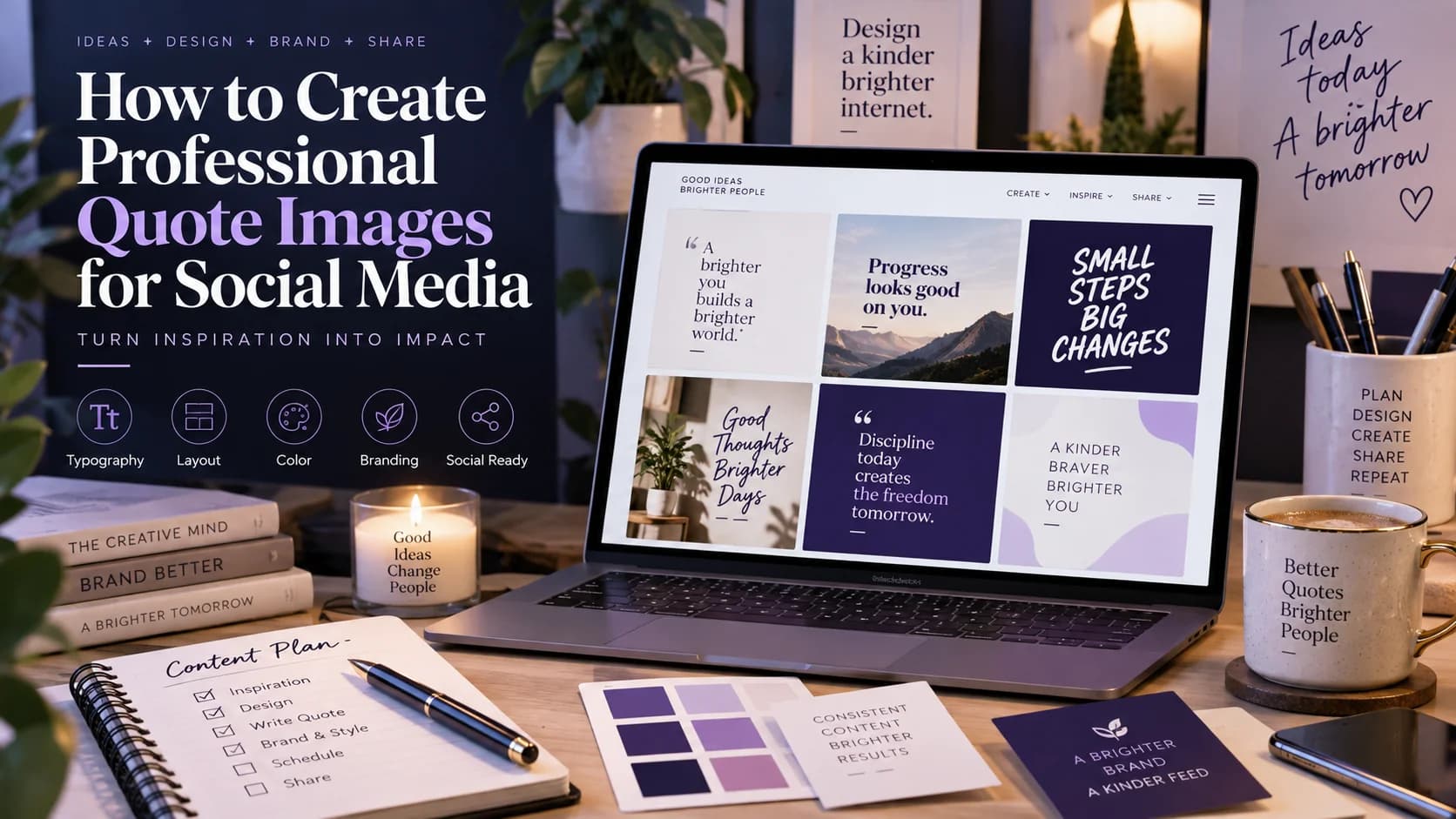
Learn how to create professional quote images for Instagram, LinkedIn, Facebook, and other social platforms with better typography, branding, and layouts.
A good quote can stop the scroll.
But simply placing a sentence on a background does not automatically create a professional social media post.
The best quote images combine strong typography, clean composition, brand identity, and a message that fits the audience.
With The Post Engine, you can turn ideas, quotes, and content themes into branded social media visuals without rebuilding every design from scratch.
What Makes a Quote Image Look Professional?
A professional quote graphic usually has five important elements:
1. Strong typography
Choose fonts that match your brand and make the quote easy to read.
2. Clear hierarchy
The most important words should immediately stand out.
3. Consistent branding
Use your brand colors, fonts, logo, or visual style consistently.
4. Enough space
Avoid filling every part of the canvas. White space makes the design easier to understand.
5. A strong visual background
Use photography, gradients, textures, or simple shapes without making the quote difficult to read.
Design principle: The quote should be the hero—not the decoration.
Choose the Right Quote
Not every quote deserves a graphic.
The strongest quote posts are usually:
Useful or educational
Emotional or relatable
Highly relevant to your audience
Short enough to read quickly
Connected to your brand
Instead of:
“Success is important.”
Try something more specific:
“Consistency beats intensity when nobody is watching.”
Specific statements usually create a stronger visual and a clearer message.
5 Quote Image Styles to Try
1. Minimalist
Large typography, simple background, plenty of white space.
Best for:
Personal brands, consultants, coaches, and LinkedIn.
2. Editorial
Use elegant typography, strong margins, and magazine-inspired layouts.
Best for:
Luxury, fashion, business, and professional brands.
3. Bold Social
Large text, strong contrast, and attention-grabbing composition.
Best for:
Instagram, creators, and motivational content.
4. Photo-Based
Place the quote over a relevant photograph with a subtle overlay.
Best for:
Travel, lifestyle, fitness, and personal storytelling.
5. Branded Template
Create a repeatable format using your brand colors, typography, and layout.
Best for:
Businesses publishing quote content regularly. Create Quote Images with Studio
##############IMAGE 2 — QUOTE STYLES
How to Create a Branded Quote Image
A simple workflow can make quote creation much faster.
Step 1: Start with the message
Choose one clear idea.
Step 2: Match the design to your brand
Your visual style should feel like the rest of your content.
Step 3: Create hierarchy
Make the key phrase larger or stronger than supporting text.
Step 4: Add subtle branding
Logo, username, colors, or another recognizable element can help reinforce identity.
Step 5: Check readability
View the design on mobile before publishing.
Studio — Quote Image Generator
################IMAGE 3 — QUOTE CREATION WORKFLOW
Use Brand DNA for Consistent Quote Designs
Creating one attractive quote image is easy.
Creating 50 that all feel like the same brand is harder.
The Post Engine's Brand DNA helps identify your brand's visual and content characteristics so your social content can stay consistent.
This can help you maintain the same:
Voice → Audience → Positioning → Content Style → Visual Direction
check this : How to Find Your Brand Voice on Social Media.
Turn Quotes Into a Content Series
Don't treat quote images as one-off posts.
Turn them into a repeatable content series.
For example:
Monday: Industry insight
Wednesday: Customer-focused quote
Friday: Motivational quote
You can keep the same visual identity while changing the message.
This creates a recognizable content format your audience can associate with your brand.
try it from Quote Image Studio.
Use Competitor Intelligence for Better Quote Ideas
Your competitors can also reveal useful content patterns.
Look at:
Which topics they repeatedly post
Which quotes generate engagement
What visual styles they use
Which audience problems appear frequently
The Post Engine's Competitor Intelligence helps you analyze competitors and discover content opportunities.
Instead of copying their quote posts, identify the topics and audience interests that are getting attention and create your own perspective.
Read this : AI Competitor Analysis for Social Media
###########IMAGE 4 — COMPETITOR + QUOTE CONTENT
Create Professional Quote Images Faster With The Post Engine
A professional quote post should be:
Readable + Branded + Consistent + Relevant
The Post Engine helps connect your content strategy with your social media creation workflow, so quote graphics can become part of a larger publishing system instead of isolated designs.
Use:
Brand DNA to stay consistent.
Competitor Intelligence to discover opportunities.
Studio Quote Images to turn those ideas into visuals.
Analytics & Growth to learn which content performs best.
Frequently Asked Questions
What size should a social media quote image be?
For Instagram feed posts, a vertical format such as 1080 × 1350 is a strong choice because it occupies more screen space than a square post.
How many words should a quote image have?
Keep the message short enough to understand quickly. If the quote becomes too long, split it into a carousel or use the caption for additional context.
What font is best for quote graphics?
There is no single best font. Choose one that fits your brand and remains highly readable on mobile devices.
Should I put my logo on quote images?
Yes, but keep branding subtle. The quote should remain the primary focus.
Final Takeaway
Professional quote images are not just text on a background.
They combine:
A strong message + Good typography + Brand consistency + Clean design
The goal is to create quote content that people recognize as your brand before they even read the account name.
Create smarter, branded social content with The Post Engine →