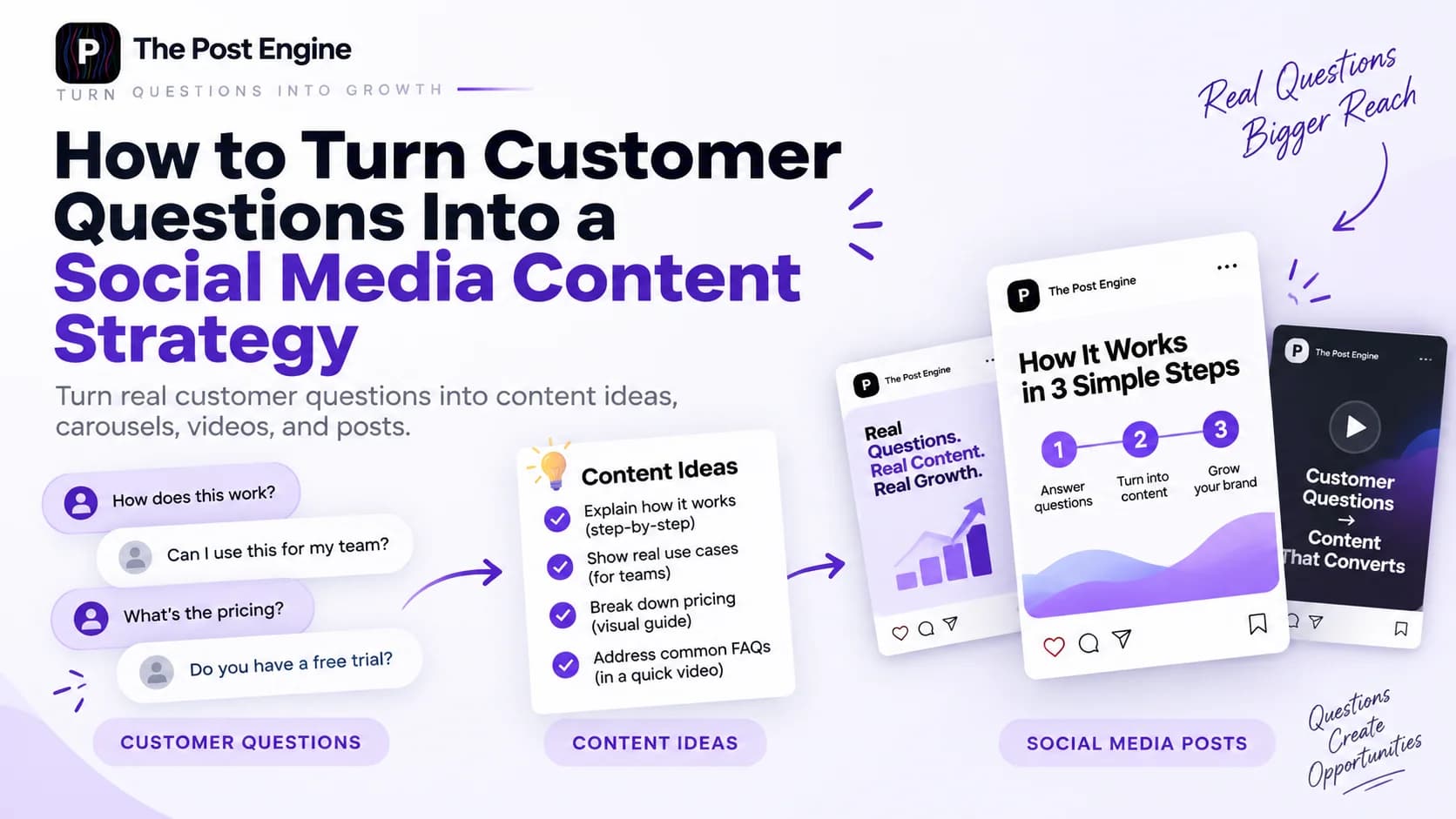
Discover how to turn customer questions into social media content. Discover where to find questions, how to turn them into content ideas, and how AI can help scale the process.
Creating social media content consistently can be difficult when you feel like every post needs a completely new idea.
But your customers may already be giving you those ideas.
Questions from comments, reviews, support messages, sales conversations, and online communities can reveal exactly what your audience wants to understand.
Instead of constantly asking:
“What should we post?”
Ask:
“What are our customers already asking?”
When you use customer questions as the starting point for your content strategy, you can create content that answers real problems, addresses objections, and gives your audience useful information.
The result is a content strategy based on real customer needs instead of guesses.
Why Customer Questions Are a Better Content Starting Point
One of the biggest problems with social media content is starting from a blank page.
You ask your team for ideas.
You search for trends.
You ask AI to generate dozens of topics.
And eventually, you end up with a long list of ideas that may or may not matter to your audience.
Customer questions give you a different starting point.
A question usually tells you that someone has a problem, uncertainty, objection, or interest.
For example:
“Is this product suitable for beginners?”
That question can reveal several things at once.
The customer may want to know whether the product is easy to use, whether they need prior experience, what results they can expect, or whether another option would be better.
That means one question can lead to multiple content opportunities.
Question-based content can help you:
Answer common objections
Explain complicated products
Educate potential customers
Address buying concerns
Demonstrate expertise
Discover content gaps
Create more relevant posts
The main advantage is simple:
Your audience is helping you decide what deserves your attention.
Instead of guessing what people want to see, you can use the questions they are already asking as evidence.
Where to Find Questions Your Customers Are Already Asking
The best questions are often hiding in places you already use every day.
You don't need to build a complicated research system before you begin.
Customer Support Messages
Support emails, live chats, contact forms, and direct messages can reveal questions that come up again and again.
A question that your support team answers every week may be a perfect topic for a public educational post.
For example:
“How long does setup take?”
could become:
How Long Does It Really Take to Get Started?
Or:
“Can I use this if I already have another tool?”
could become:
How to Combine This With Your Existing Workflow
The goal is to turn repeated private conversations into useful public answers.
Product Reviews
Product reviews can provide more than social proof.
They can reveal:
Common concerns
Product expectations
Questions about features
Problems customers experience
Benefits customers mention repeatedly
Confusion about how something works
Read both positive and negative reviews.
A positive review may reveal a benefit you should explain more often.
A negative review may reveal a concern that deserves educational content.
Comments and Social Media Replies
Comments are one of the most direct sources of audience questions.
Look at comments on:
Instagram
Facebook
TikTok
LinkedIn
YouTube
Don't only look for explicit questions.
Comments such as:
“Does this work for small businesses?”
or:
“Would this work without a large budget?”
are useful content signals too.
You can also look at the questions people leave under competitors' posts to identify topics your market is discussing.
Sales Conversations
Your sales team often hears the same questions before someone decides to buy.
For example:
Why is this better than another option?
How quickly will I see results?
What happens after purchase?
Is this suitable for my business?
Why does it cost more?
What exactly is included?
These questions are especially valuable because they are connected to purchasing decisions.
Answering them through content can reduce uncertainty before a prospect reaches the sales stage.
Reddit, Quora, and Online Communities
Online communities can show you how people describe problems in their own words.
Reddit's search can be used to explore posts and comments around specific topics, and community-focused searches can help uncover recurring questions and discussions.
Quora can also be useful for discovering questions people ask around specific subjects.
The value of these platforms is not simply finding topics.
It's discovering the language behind the problem.
That language can later become your headline, hook, or content angle.
Search Suggestions and FAQs
Search suggestions can reveal what people are actively typing into search engines.
Google explains that Autocomplete predictions reflect searches people have made and can also be influenced by language, location, and trending interest.
For example, if your topic is social media marketing, start typing:
social media content...
and look at the suggested searches that appear.
You can then combine those search ideas with questions you collect directly from customers.
IMAGE 2 — QUESTION SOURCES
How to Turn One Customer Question Into a Content Idea
Finding a question is only the first step.
The next step is understanding the real problem behind it.
Let's use a simple example:
“Is this product suitable for beginners?”
A weak approach would be to simply answer:
“Yes, it is suitable for beginners.”
A stronger approach is to explore what the customer is actually trying to understand.
Maybe they want to know:
How difficult is it to use?
What should a beginner know first?
How long does it take to learn?
What mistakes should beginners avoid?
Is there a better option for experienced users?
Now you have several content angles.
Identify the Real Problem
Ask:
Why is the customer asking this question?
The answer may reveal a larger concern.
Find the Main Answer
Determine the most useful information the customer needs.
Avoid adding unnecessary information just to make the post longer.
Turn the Answer Into a Content Angle
You can turn one answer into:
Educational content:5 Things Beginners Should Know
Problem-solving content:3 Common Mistakes Beginners Make
Comparison content:Which Option Is Better for Beginners?
Product content:Why Beginners Choose This Product
Add a Useful Takeaway or CTA
Every piece of content should give the audience a reason to continue.
That could be:
Save this guide
Comment with your question
Read the full guide
Compare the two options
Explore the product
Try the workflow yourself
The question gets your attention.
The answer and takeaway create the content.
7 Types of Social Media Content You Can Create From Customer Questions
One customer question doesn't have to become one FAQ post.
It can become several different content formats.
Educational Posts
Take the answer and explain it clearly.
Example:
“What Should Beginners Know Before Using This Product?”
Educational content works especially well when the question involves confusion or a knowledge gap.
Carousels
Break the answer into a sequence of useful points.
For example:
Slide 1: Is This Product Good for Beginners?
Slide 2: Who It's For
Slide 3: What You Need to Get Started
Slide 4: Common Beginner Mistakes
Slide 5: What Results to Expect
Slide 6: Final Recommendation
A single customer question becomes a structured educational experience.
Short-Form Videos
Questions can become excellent video hooks.
For example:
“Wondering how long it takes to see results? Here's what you should actually expect.”
The question immediately gives the viewer a reason to keep watching.
You can turn the answer into a short tutorial, demonstration, explanation, or reaction.
FAQ Posts
Sometimes the best content is simply the direct answer.
For example:
Question:“Can I use this with my existing tools?”
Answer:Explain compatibility, limitations, and the recommended setup.
Simple doesn't mean weak.
A clear answer to a real question can be more valuable than a complicated post built around a generic trend.
Comparison Content
Questions that compare options are perfect for comparison content.
For example:
“What's the difference between these two products?”
could become:
A vs. B: Which One Should You Choose?
You can compare:
Features
Pricing
Use cases
Difficulty
Best audience
Advantages
Limitations
Problem/Solution Posts
Some questions reveal a pain point.
For example:
“Why am I getting views but no sales?”
This can become:
5 Reasons Your Social Media Views Aren't Turning Into Customers
The question becomes the problem.
Your content provides the solution.
Product-Focused Content
Customer questions can also help you explain your product without making every post feel promotional.
For example:
“What does this feature actually do?”
could become:
3 Ways This Feature Can Improve Your Workflow
The content starts with a real question instead of a sales pitch.
Example: From One Customer Question to Multiple Posts
Let's take one simple question:
“How long does it take to see results?”
Instead of answering it once, build a small content cluster around it.
Original Question
How long does it take to see results?
Main Content Angle
Set realistic expectations and explain the factors that influence results.
Example Instagram Post
Hook:“How long should you really wait before judging your results?”
Explain the typical timeline, key factors, and what customers should look for.
Example Carousel
Slide 1:How Long Does It Take to See Results?
Slide 2:The timeline isn't the same for everyone
Slide 3:Factor #1: Starting point
Slide 4:Factor #2: Consistency
Slide 5:Factor #3: Strategy
Slide 6:What you should measure instead
Slide 7:The key takeaway
Example Short Video
Start with:
“If you're expecting results after one week, here's what you need to know.”
Then explain the realistic timeline in under a minute.
Example Promotional Post
Connect the answer to your product or service:
“Want to shorten the learning curve? Here's how our workflow can help you move from idea to execution faster.”
One customer question has now become several pieces of content with different purposes.
IMAGE 3 — ONE QUESTION TO MULTIPLE POSTS
How to Organize Customer Questions Into Content Categories
Collecting questions is useful.
Organizing them is what turns them into a strategy.
Create categories based on the types of questions people ask.
Beginner Questions
These are questions from people who are just getting started.
Examples:
How do I begin?
What do I need?
Is this difficult?
How long does it take to learn?
These questions can become beginner guides, tutorials, and introductory videos.
Product Questions
Examples:
What does this feature do?
What's included?
How does it work?
What makes it different?
These questions are perfect for educational product content.
Pricing Questions
Examples:
Is it worth the price?
Why does it cost more?
What's included in each plan?
Pricing questions often reveal value concerns, which means the content should explain why the product matters, not only what it costs.
Comparison Questions
Examples:
What's the difference between A and B?
Which one should I choose?
Which is better for this use case?
Comparison questions can become carousels, videos, guides, and decision-making content.
Objections
Examples:
Will this work for me?
What if I already use another tool?
Is it too complicated?
Is it worth changing my current process?
These questions can help you create content that removes uncertainty.
How-To Questions
Examples:
How do I use it?
How do I get better results?
How do I solve this problem?
These are natural opportunities for tutorials, demos, and educational videos.
Advanced Questions
Once customers become more experienced, their questions become more specific.
Examples:
Can I use this for a more advanced workflow?
How can I optimize this process?
What should I do at a larger scale?
These questions are useful for creating deeper content for experienced users.
How AI Can Help Turn Questions Into Social Media Content
Once you've collected real customer questions, AI can help you develop them faster.
You can use AI to:
Generate multiple content angles
Create hooks
Adapt an idea to different formats
Generate captions
Create visual concepts
Build platform-specific variations
For example, give AI this customer question:
“How can I get better results without spending more time?”
Instead of asking for random post ideas, ask AI to create:
5 educational angles
5 short-video hooks
3 carousel concepts
2 product-focused angles
3 calls to action
Now the AI is working from a real customer need.
That distinction matters.
Don't let AI invent the problem. Give AI the problem your customer already described.
Then use AI to accelerate the creative process.
Sprout Social's 2026 research similarly emphasizes deeper consumer understanding and using AI to improve efficiency and audience insights while keeping human judgment and platform-specific strategy central to content decisions.
How to Build a Repeatable Question-to-Content Workflow
The real value comes when this becomes a system rather than a one-time exercise.
Collect
Continuously collect questions from customers.
You can store them in a simple spreadsheet, CRM, support system, or content database.
Categorize
Group them by:
Topic
Customer stage
Product
Content pillar
Problem
Buying objection
Prioritize
Not every question needs a post.
Start with questions that are:
Frequently asked
Important to your customers
Connected to purchasing decisions
Relevant to a large part of your audience
Useful enough to save or share
Create
Turn the best questions into the appropriate content formats.
One question might become a carousel.
Another might work better as a 30-second video.
Another may only need a simple FAQ post.
Publish
Adapt the message to each platform.
A question that works as an Instagram carousel may need a different treatment for LinkedIn or YouTube.
Don't just copy and paste.
Measure
Track what happens after publishing.
Look at:
Engagement
Shares
Saves
Comments
Clicks
Leads
Conversions
The purpose isn't to chase vanity metrics.
It's to learn which questions, topics, and formats are most valuable.
Reuse
When a question performs well, don't throw it away after one post.
Create a new angle.
Turn the carousel into a short video.
Turn the video into a text post.
Create a new hook.
Answer a related question.
This creates a continuous feedback loop:
Collect → Categorize → Prioritize → Create → Publish → Measure → Reuse
IMAGE 4 — QUESTION-TO-CONTENT WORKFLOW
How The Post Engine Fits Into the Workflow
The strategy starts with your customers.
The production process comes next.
Once you've identified the best questions and turned them into content angles, The Post Engine can help you move from idea to publishable social media content.
For example:
Customer question
“Is this suitable for beginners?”
↓
Content angle
“5 Things Beginners Should Know”
↓
Content creation
Turn the idea into a social post or visual.
↓
Publishing
Prepare it for the platforms you use.
↓
Performance
Monitor how the audience responds.
The Post Engine brings content creation, publishing, and analytics into one connected workflow. Its AI Content Studio creates on-brand content, while its publishing and analytics tools help move that content from creation to performance tracking.
A useful next step is to connect customer-question research with your existing content process. For example, your question library can feed ideas into [The Post Engine AI Content Studio] → AI Content Studio, where you can turn those ideas into social content aligned with your brand.
Keep the product section focused.
Final Takeaway: Let Your Customers Tell You What to Post
Your next social media idea may already exist in your comments, reviews, support inbox, sales conversations, or community discussions.
The key is to recognize those questions as content signals.
Don't treat every customer question as an isolated request.
Look for patterns.
A question can reveal a problem.
A repeated problem can become a content pillar.
A content pillar can become dozens of posts.
And the more you listen, create, measure, and reuse, the easier it becomes to build a social media strategy that stays relevant.
The process is simple:
Listen → Understand → Create → Publish → Measure → Improve
Instead of asking:
“What should we post today?”
start with:
“What are our customers trying to understand?”
The answer may already be your next great piece of content.
→ Your customers can tell you what to post. You just need to listen.