A rebrand is more than changing a logo.
For a business with an established social media presence, a rebrand can affect your profile names, usernames, visual identity, messaging, content, links, and the way customers recognize you.
That creates a difficult question:
What should change, and what should stay the same?
Change too little, and the new identity may not feel meaningful.
Change too much, and existing followers may struggle to recognize the brand they already know.
A successful social media rebrand therefore isn't simply about introducing a new design.
It's about creating a clear transition from the old identity to the new one.
Sprout Social notes that a social rebrand can involve visual identity, handles, taglines, brand voice, messaging, and value proposition, while also emphasizing the importance of preparing the transition before announcing it. Read Sprout Social's guide to rebranding on social media
Why Brands Rebrand on Social Media
A brand may rebrand because the business itself has changed.
Perhaps it has:
Expanded into new products or services
Changed its target audience
Updated its positioning
Merged with another company
Changed its name
Outgrown its original identity
Moved from a low-cost position to a premium one
Needed to differentiate itself in a crowded market
But social media makes a rebrand more complicated because your audience already has expectations.
People recognize your:
Profile picture
Colors
Typography
Username
Tone
Visual style
Content themes
Changing all of these at once without explanation can create confusion.
That's why the first stage of a rebrand should be deciding what the change is actually supposed to accomplish.
What Should Change During a Rebrand?
Not every rebrand requires changing everything.
Start by separating the elements that represent the old identity from the elements that are still valuable.
Some elements that may need to change include:
Brand Name
If the company has a new name, make the change clear across relevant social profiles.
Meta notes that Facebook Page names and usernames are separate, so changing a Page name does not automatically change its username. See Facebook's guide to changing a Page name
Username or Handle
Your social handle is part of how people find and mention your brand.
Before changing it, check availability across the platforms you use.
Meta also warns that changing a username can affect profile URLs and that an old username may not always be recoverable. Read Facebook's username guidance
Profile Image
Replace the logo or profile image when it is part of the new identity.
Visual Identity
This can include:
Colors
Typography
Photography
Graphics
Templates
Illustrations
Motion style
Brand Messaging
Your new identity should also appear in the words you use.
That includes:
Taglines
Value proposition
Bio
Captions
Content themes
Calls to action
A visual rebrand without a messaging change can make the transition feel incomplete.
What Should Stay the Same?
A rebrand doesn't mean throwing away everything people already associate with you.
Some brand assets should remain if they still have value.
That could include:
Your Core Promise
The way you visually present your business can change while the underlying customer promise remains recognizable.
Your Expertise
A design change doesn't erase the knowledge your audience already follows you for.
Your Best-Performing Topics
Your new identity can communicate the same useful subject areas in a different visual language.
Your Customer Relationships
Existing customers and followers shouldn't feel like the company they followed suddenly disappeared.
Valuable Brand Recognition
If certain elements have strong recognition, changing them without a reason can remove useful brand equity.
The key question is:
Does this element belong to the old identity, or does it belong to what people already value about the brand?
That distinction can make a rebrand much safer.
What Happens to Your Existing Social Media Content?
One of the most overlooked parts of a rebrand is the old content already sitting on your profiles.
Do you delete everything?
Usually, no.
Start by auditing the existing content.
Separate it into:
Keep
Content that remains useful and does not conflict with the new identity.
Update
Content that is still valuable but needs a new visual, link, caption, or branding treatment.
Archive
Content that is outdated, misleading, or strongly associated with the old positioning.
Remove
Content that creates a serious conflict with the new brand or contains information that is no longer accurate.
This is particularly important for businesses with years of content.
A full deletion can remove useful social proof and historical context.
Instead, think of the transition as a content cleanup and evolution.
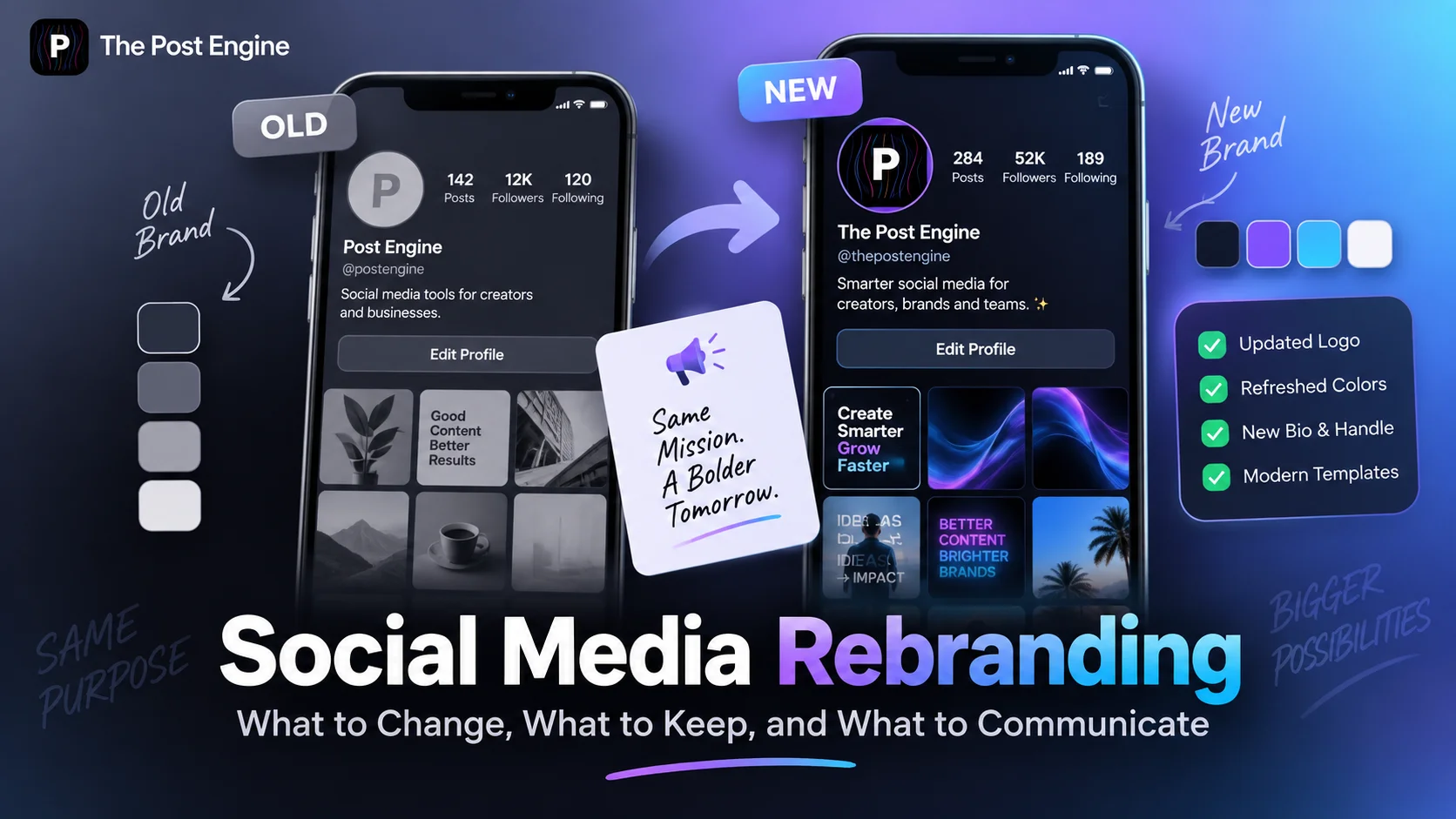
IMAGE 2 — BEFORE AND AFTER
How to Communicate the Rebrand to Your Audience
A rebrand should not feel like your account suddenly changed overnight without explanation.
Your audience needs to understand:
What changed?
Why did it change?
What does it mean for them?
What stays the same?
A good announcement answers those questions without turning the post into a corporate press release.
For example:
We’re evolving.
Our business has grown, and our new identity reflects where we're going next. You'll notice a new name, visual identity, and messaging across our channels.
Then explain the reason.
Maybe the business has expanded.
Maybe the original positioning no longer represents the company.
Maybe the brand is entering a new market.
Consider a transition period
Don't rely on one announcement.
You can introduce the change through:
Teaser content
Behind-the-scenes content
Announcement posts
Updated profile images
Founder or team messages
FAQs
Follow-up explanations
Sprout Social recommends building anticipation and preparing the announcement rather than simply changing everything without context. See its social rebranding checklist
The goal is to make the new identity feel intentional rather than sudden.
Keep Your Brand Consistent Across Platforms
A rebrand becomes much more difficult when every platform looks different.
Your Instagram may use the new logo.
Your Facebook page still has the old one.
Your YouTube banner shows the previous colors.
Your LinkedIn bio still describes the old positioning.
Your website uses another version of the name.
That creates unnecessary confusion.
Build a simple rebrand checklist for every important channel:
TikTok
YouTube
Website
Google Business Profile
Check:
Profile image
Cover/banner
Display name
Username
Bio
Description
Website link
Brand colors
Visual templates
Pinned content
Contact information
Meta also notes that Facebook and Instagram can be connected through Accounts Center, which can help businesses manage related profile information across the platforms. See Meta's guide to connecting a Facebook Page to Instagram
Avoid Common Social Media Rebranding Mistakes
Changing everything without explaining why
Your audience may think the account belongs to a different company.
Changing the username without planning for the old one
A handle change can affect profile links and how people find you.
Keeping outdated information
A new visual identity doesn't help if old bios, links, and descriptions still communicate the previous brand.
Deleting years of useful content
Some content may still have search value, engagement, or customer proof.
Focusing only on the logo
A rebrand should communicate through visuals and messaging.
Launching before everything is ready
Broken links, mismatched profiles, and missing assets can make the new brand feel unfinished.
Forgetting internal teams
Employees, creators, and agencies can continue using old logos, colors, or messaging if they are not given the updated brand system.
The more platforms and people involved, the more important a centralized brand reference becomes.
Measure the Transition
A rebrand isn't successful just because the new logo looks better.
You need to see how your audience responds.
Before launching, capture a baseline for:
Engagement
Profile visits
Followers
Website clicks
Mentions
Sentiment
Branded searches
Leads or conversions
Then compare performance after the change.
Look especially for unusual changes in:
Profile visits
Engagement
Follower growth
Website traffic
Customer questions
Brand mentions
Negative feedback
Don't judge the entire rebrand from the first few days.
A new identity may require time for people to recognize and understand.
Research from Lucidpress found that organizations viewed brand consistency as strongly connected to customer relationships and revenue, although the underlying studies are older and should be treated as directional rather than a current 2026 benchmark. Its 2021 report found that 77% of respondents dealt with off-brand content, while its earlier research reported perceived revenue gains from stronger brand consistency. See the State of Brand Consistency research
IMAGE 3 — REBRAND CHECKLIST
Build the New Brand System With The Post Engine
A rebrand is not finished when the announcement goes live.
The next challenge is keeping the new identity consistent across everything you create afterward.
This is where a centralized brand system becomes useful.
The Post Engine's Brand DNA Engine is designed to capture elements such as brand voice, positioning, audience, content pillars, formats, and posting patterns, giving the content-creation process a consistent reference point. Explore The Post Engine
For a rebrand, the workflow can look like:
New brand identity
↓
Brand rules
↓
Brand DNA
↓
New content templates
↓
Social posts
↓
Publishing
↓
Performance feedback
The Post Engine Brand DNA Engine can be introduced here as the system that helps translate the updated identity into future content.
→ How to Generate Different Social Media Post Styles in One Place.
IMAGE 4 — BRAND SYSTEM
Frequently Asked Questions
Should you delete old social media posts after a rebrand?
Not necessarily. Review old content individually. Keep useful content, update what can be refreshed, archive content that conflicts with the new identity, and remove content that is inaccurate or harmful.
Should you change your username during a rebrand?
If the username is no longer relevant to the new brand, changing it may make sense. However, check availability, profile URLs, platform rules, and the impact on existing links before making the change.
How do you announce a rebrand on social media?
Explain what changed, why it changed, and what customers can expect. A teaser or transition period can help your audience understand the change before the new identity is fully introduced.
How long should a social media rebrand take?
There is no universal timeline. A small visual refresh may take weeks, while a complete change involving the name, messaging, website, multiple platforms, and internal teams can take considerably longer.
What is the difference between a brand refresh and a rebrand?
A refresh usually updates parts of an existing identity while keeping much of the underlying brand intact. A full rebrand can involve a more fundamental change to the name, positioning, messaging, visual identity, or market perception.
Final Takeaway
A successful social media rebrand isn't about changing everything.
It's about knowing what needs to change, what customers already recognize, and what needs to be explained.
Change the identity where the old version no longer represents the business.
Keep the elements that still create recognition and trust.
Audit existing content instead of automatically deleting it.
Prepare every important platform.
Explain the reason behind the change.
Then build a system that keeps the new identity consistent after launch.
Think of the transition as:
Audit → Decide → Prepare → Announce → Update → Measure → Maintain
Your audience doesn't need a completely unfamiliar brand.
They need to understand:
“This is the same business, evolving into what it needs to become.”
A strong rebrand makes that evolution clear.